> ## Documentation Index
> Fetch the complete documentation index at: https://docs.prophecy.ai/llms.txt
> Use this file to discover all available pages before exploring further.
# Project tests
> Create a pipeline that validates specific data conditions
Project tests are custom SQL queries that validate data conditions. You build each test as a visual pipeline ending with a Data Test gem. The pipeline returns data that the Data Test gem evaluates using configurable parameters to determine whether the test passes or fails.
Use project tests to validate data that spans multiple models or tables, or to test specific transformation logic. Common use cases include verifying referential integrity across related tables, ensuring aggregated values meet business rules, or validating that complex transformations produce expected results.
Project tests are based on [dbt singular data
tests](https://docs.getdbt.com/docs/build/data-tests#singular-data-tests).
Use **project tests** when you need to test a specific workflow or combination of models that
won't be reused elsewhere. Use [test definitions](/data-analysis/development/tests/table-tests)
when you want to apply the same standardized test (like checking for uniqueness or null values)
across multiple tables or models in your project.
## Understand project test flow
Project tests evaluate data through a two-step process:
1. **Pipeline execution**: Your visual pipeline executes and returns data. The pipeline can filter, transform, or aggregate data to prepare it for evaluation.
2. **Data Test evaluation**: The Data Test gem applies the **Failure Calculation** to the pipeline output, then evaluates the **Error If** and **Warning If** conditions against that calculated value to determine the test result.
The test passes when the **Error If** and **Warning If** conditions are not met.
## Data Test gem parameters
When you create a project test, a Data Test gem appears on an otherwise empty canvas. The Data Test gem evaluates the rows returned by your pipeline and determines whether the test passes or fails based on the following parameters:
| Parameter | Description | Default |
| ----------------------- | ------------------------------------------------------------------------------------------------------------------------------------------------------------------------------------------------------------------------------ | ---------------- |
| **Failure Calculation** | Expression that calculates a value from the test results. The **Error If** and **Warning If** conditions evaluate this calculated value. | `count(*)` |
| **Limit** | Maximum number of failure rows to return. Set this to reduce query execution time and resource usage when testing large datasets. The test stops after finding the specified number of violations. | Empty (no limit) |
| **Severity** | Determines whether failures return an error or warning. When set to `error`, the test checks **Error If** conditions first, then **Warning If** conditions. When set to `warning`, only **Warning If** conditions are checked. | `error` |
| **Error If** | Condition that triggers an error. Evaluates the **Failure Calculation** result. If true and severity is `error`, the test fails with an error status. | `!=0` |
| **Warning If** | Condition that triggers a warning. Evaluates the **Failure Calculation** result. If true, the test returns a warning status (regardless of severity setting). | `!=0` |
If you leave all parameters empty, Prophecy uses the default values. Customize parameters when you
need more control over test behavior.
The Data Test gem evaluates your pipeline output in this order:
1. Applies the **Failure Calculation** expression, producing a single value.
2. Evaluates the **Error If** condition against the calculated value (if severity is `error`).
3. If the **Error If** condition is not met, evaluates the **Warning If** condition.
4. Returns the test result.
| Example | Failure Calculation | Error If | Description |
| ------------------- | ------------------- | -------- | ------------------------------------------------------------------------ |
| **Default** | `count(*)` | `!=0` | Counts rows. Fails if any rows exist, passes if no rows. |
| **Threshold-based** | `count(*)` | `>100` | Counts rows. Fails only if more than 100 rows exist. |
| **Aggregate-based** | `sum(amount)` | `<0` | Sums a column. Fails if the sum is negative, passes if zero or positive. |
## Build and run a test
The following example procedure creates a test named `assert_total_payment_amount_is_positive` that validates payment data.
For each order, there might be multiple transactions, where negative transactions represent refunds. The total payment amount for an order is the sum of all transaction amounts and should never be negative.
If we use the default parameters, we need to build a pipeline that:
1. Aggregates payments by order to calculate total amounts
2. Filters to return only orders with negative totals (violations)
3. Passes these violation rows to the Data Test gem
With default parameters `count(*)` and `Error If !=0`, if any orders have negative totals, the Data Test gem receives rows, the count is greater than 0, and the test fails. If no orders have negative totals, the count is 0, and the test passes.
### 1. Create a project test entity
To develop a project test, start by opening a project:
1. In the left sidebar, click **+ Add Entity**.
2. Hover the **Tests** option and select **Project tests**.
3. Enter a name for your test, such as `assert_total_payment_amount_is_positive`.
4. Keep the default path `tests` where Prophecy will store the test.
5. Click **Create**.
### 2. Build the test pipeline
Build a pipeline that returns data for the Data Test gem to evaluate. In this example, we'll return only rows that violate the business rule, which works well with default parameters.
1. Drag a table onto the canvas.
In this example, we'll use a `payments` table:
| order\_id | amount |
| --------- | ------- |
| ORD-001 | 150.00 |
| ORD-001 | -25.00 |
| ORD-002 | 200.00 |
| ORD-003 | 100.00 |
| ORD-003 | -150.00 |
2. Add an **Aggregate** gem after the `payments` table.
3. Configure the Aggregate gem to sum the `amount` column grouped by `order_id`.
4. Add a **Filter** gem after the Aggregate gem.
5. Configure the Filter gem with the condition `amount_sum < 0` to return only orders where the total amount is negative.
6. Connect the Filter gem to the **Data Test** gem.
Because `ORD-003` has a negative total amount `(100.00 + (-150.00) = -50.00)`, the test will
return an error.
### 3. Review the Data Test gem
Since we are using the default parameters, we don't need to configure the Data Test gem. However, we can review the default parameters and the SQL query to understand how the test works.
1. Open the **Data Test** gem.
2. Keep the default parameters. Without modifying the parameters, the test returns an error if the input to the Data Test gem has any rows.
3. Review the **Final Query** code editor. This displays the SQL query generated from your visual pipeline. The test executes this query against your data warehouse. You don't need to edit it, but reviewing it helps verify the test logic.
4. Click **Save**.
### 4. Run the project test
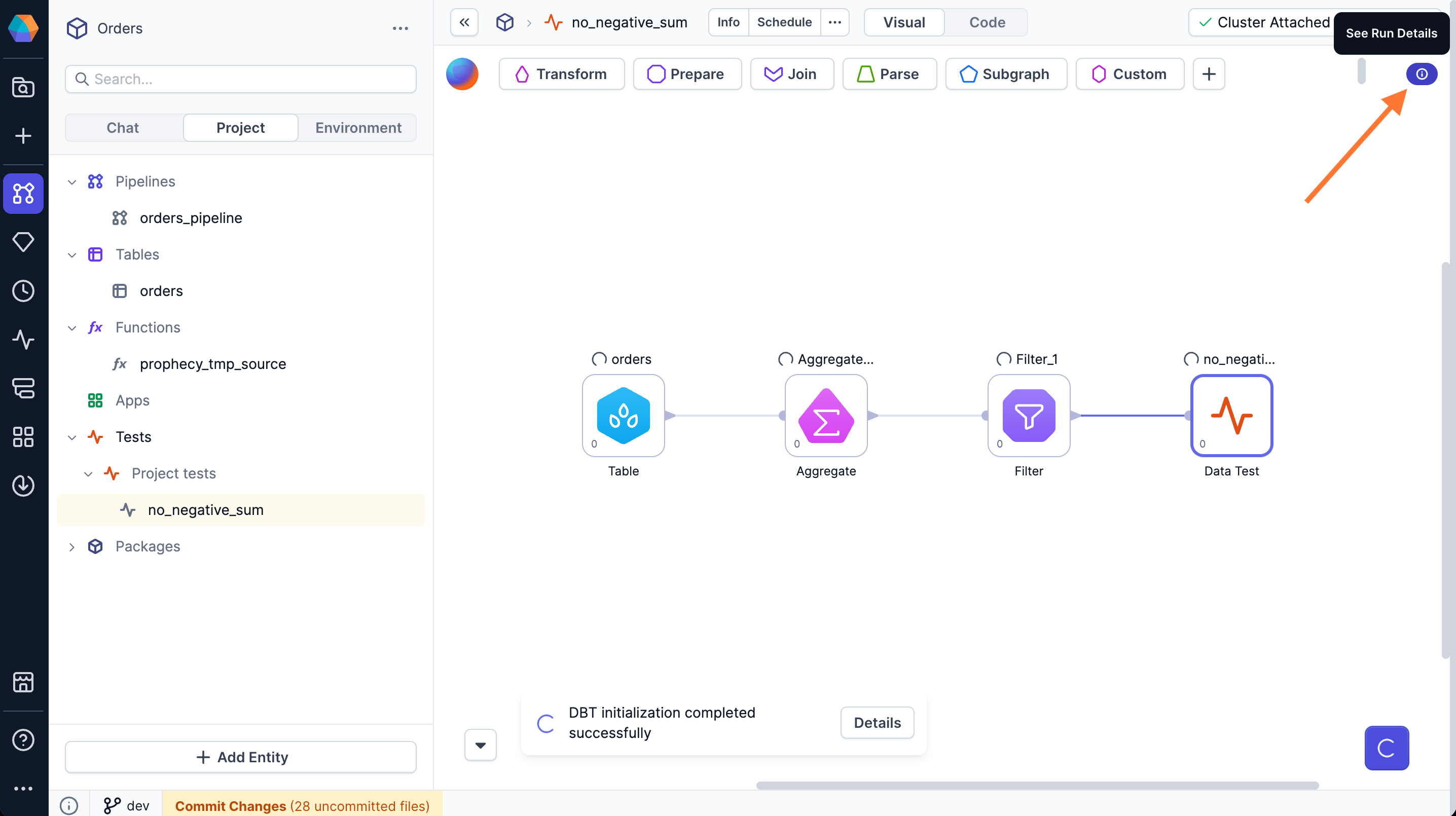
Run the whole pipeline to see the test result.
1. Click the **Play** button on the canvas or on the Data Test gem.
2. The test executes the SQL query from the **Final Query** against your data warehouse.
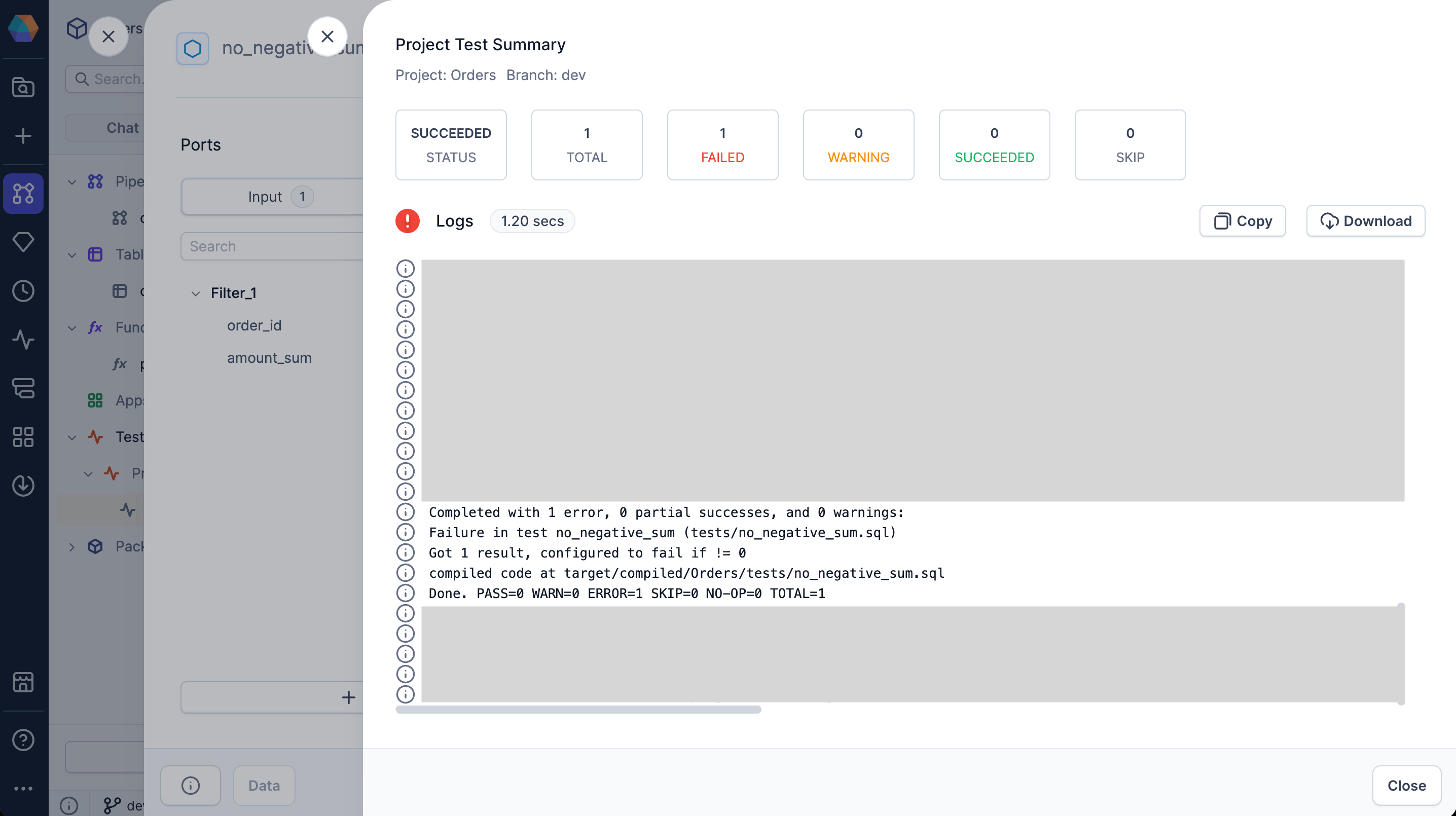
3. Click **See Run Details** in the top right of the canvas to view the test summary.
 4. Review the test status: succeeded, warning, or failed.
5. For failed tests, expand the logs section to view detailed dbt execution logs. The logs show the SQL query that was executed and the test result.
4. Review the test status: succeeded, warning, or failed.
5. For failed tests, expand the logs section to view detailed dbt execution logs. The logs show the SQL query that was executed and the test result.
 You can execute a partial pipeline run by clicking play on an intermediate gem. However, since the
execution stops before reaching the Data Test gem, the test will not run.
### 5. Schedule test runs
Project tests can run as part of a pipeline schedule.
1. Open the pipeline you want to associate with project tests.
2. In the project header, click **... > Schedule**.
3. Edit the existing schedule or configure a new schedule.
4. Under **Project level tests**, select the tests you want to run.
5. Click **Confirm** to save the changes.
If a scheduled test fails, you'll be able to see the test logs in the [Observability](/data-analysis/production/monitoring) interface.
You must enable the schedule and publish the project to activate the automation.
Learn more in [Schedule activation](/data-analysis/production/scheduling/scheduling#schedule-activation).
When scheduling models only (not pipelines), configure tests through jobs:
1. In the left sidebar, click **+ Add Entity** > **Job**.
2. Enter a name for your job and click **Create New**.
3. Drag a **Model** gem to the canvas.
4. Click the model to open its properties.
5. Select the database object to test.
6. Select the **Run tests** checkbox in the left sidebar.
7. Verify your **project**, **model**, and **fabric** settings.
8. Click **Save**.
## Troubleshooting test failures
When a project test fails, determine whether the failure indicates a data quality issue or a configuration problem.
### Test failure (data quality issue)
The test evaluates the pipeline output using the configured **Failure Calculation** and **Error If** or **Warning If** conditions, and the conditions are met, indicating that your data violates the test criteria. The test is working correctly, but your data doesn't meet the expected criteria.
When this happens, you should review the test logs to see which conditions were met. Either fix the data issue or consider adjusting the **Error If** or **Warning If** thresholds if the current values are too strict or too lenient.
For example, in the `assert_total_payment_amount_is_positive` test with default parameters, if the query returns rows and the count is greater than 0, it means there are orders with negative total payment amounts. You would need to investigate why those orders have negative totals.
### Execution error (configuration or setup issue)
The test cannot run properly due to a technical problem. Common causes include:
* The input table no longer exists or the input data sources are inaccessible.
* The **Failure Calculation** function is invalid or contains syntax errors.
* The **Error If** or **Warning If** conditions are invalid or contain syntax errors.
* The SQL query itself has syntax errors.
You can execute a partial pipeline run by clicking play on an intermediate gem. However, since the
execution stops before reaching the Data Test gem, the test will not run.
### 5. Schedule test runs
Project tests can run as part of a pipeline schedule.
1. Open the pipeline you want to associate with project tests.
2. In the project header, click **... > Schedule**.
3. Edit the existing schedule or configure a new schedule.
4. Under **Project level tests**, select the tests you want to run.
5. Click **Confirm** to save the changes.
If a scheduled test fails, you'll be able to see the test logs in the [Observability](/data-analysis/production/monitoring) interface.
You must enable the schedule and publish the project to activate the automation.
Learn more in [Schedule activation](/data-analysis/production/scheduling/scheduling#schedule-activation).
When scheduling models only (not pipelines), configure tests through jobs:
1. In the left sidebar, click **+ Add Entity** > **Job**.
2. Enter a name for your job and click **Create New**.
3. Drag a **Model** gem to the canvas.
4. Click the model to open its properties.
5. Select the database object to test.
6. Select the **Run tests** checkbox in the left sidebar.
7. Verify your **project**, **model**, and **fabric** settings.
8. Click **Save**.
## Troubleshooting test failures
When a project test fails, determine whether the failure indicates a data quality issue or a configuration problem.
### Test failure (data quality issue)
The test evaluates the pipeline output using the configured **Failure Calculation** and **Error If** or **Warning If** conditions, and the conditions are met, indicating that your data violates the test criteria. The test is working correctly, but your data doesn't meet the expected criteria.
When this happens, you should review the test logs to see which conditions were met. Either fix the data issue or consider adjusting the **Error If** or **Warning If** thresholds if the current values are too strict or too lenient.
For example, in the `assert_total_payment_amount_is_positive` test with default parameters, if the query returns rows and the count is greater than 0, it means there are orders with negative total payment amounts. You would need to investigate why those orders have negative totals.
### Execution error (configuration or setup issue)
The test cannot run properly due to a technical problem. Common causes include:
* The input table no longer exists or the input data sources are inaccessible.
* The **Failure Calculation** function is invalid or contains syntax errors.
* The **Error If** or **Warning If** conditions are invalid or contain syntax errors.
* The SQL query itself has syntax errors.