> ## Documentation Index
> Fetch the complete documentation index at: https://docs.prophecy.ai/llms.txt
> Use this file to discover all available pages before exploring further.
# Reformat gem for Data Analysis
> Use expressions to reformat column names and values
export const gemName_0 = "Reformat"
export const execution_engine_0 = "the SQL warehouse"
This gem runs in {execution_engine_0}.
## Overview
Use the Reformat gem to:
* rename columns
* create calculated columns
* modify existing column values
* change data types
* select which columns appear in the output dataset
Use expressions and functions to transform values, combine columns, clean data, or create new derived fields.
The {gemName_0} gem has a corresponding interactive gem example. See [Interactive gem
examples](/data-analysis/gems/gems#interactive-gem-examples) to learn how to run sample pipelines
for this and other gems.
## Common transformation examples
| Goal | Example expression | | | | |
| :-------------------------- | :----------------------------------------- | - | --- | - | ------------ |
| Rename a column | Set `Target column` to the new column name | | | | |
| Create a full name column | \`first\_name | | ' ' | | last\_name\` |
| Convert text to uppercase | `UPPER(customer_name)` | | | | |
| Replace null values | `COALESCE(region, 'Unknown')` | | | | |
| Create a calculated field | `price * quantity` | | | | |
| Convert a value to a string | `CAST(order_id AS STRING)` | | | | |
| Extract part of a date | `YEAR(order_date)` | | | | |
## Parameters
| Parameter | Description | Required |
| :------------ | :---------------------------------- | :--------------------------------------- |
| Model | Input dataset to transform | True |
| Target column | Output column name | False |
| Expression | Expression to compute target column | Required if a `Target column` is present |
If no columns are selected, then all columns are passed through to the output.
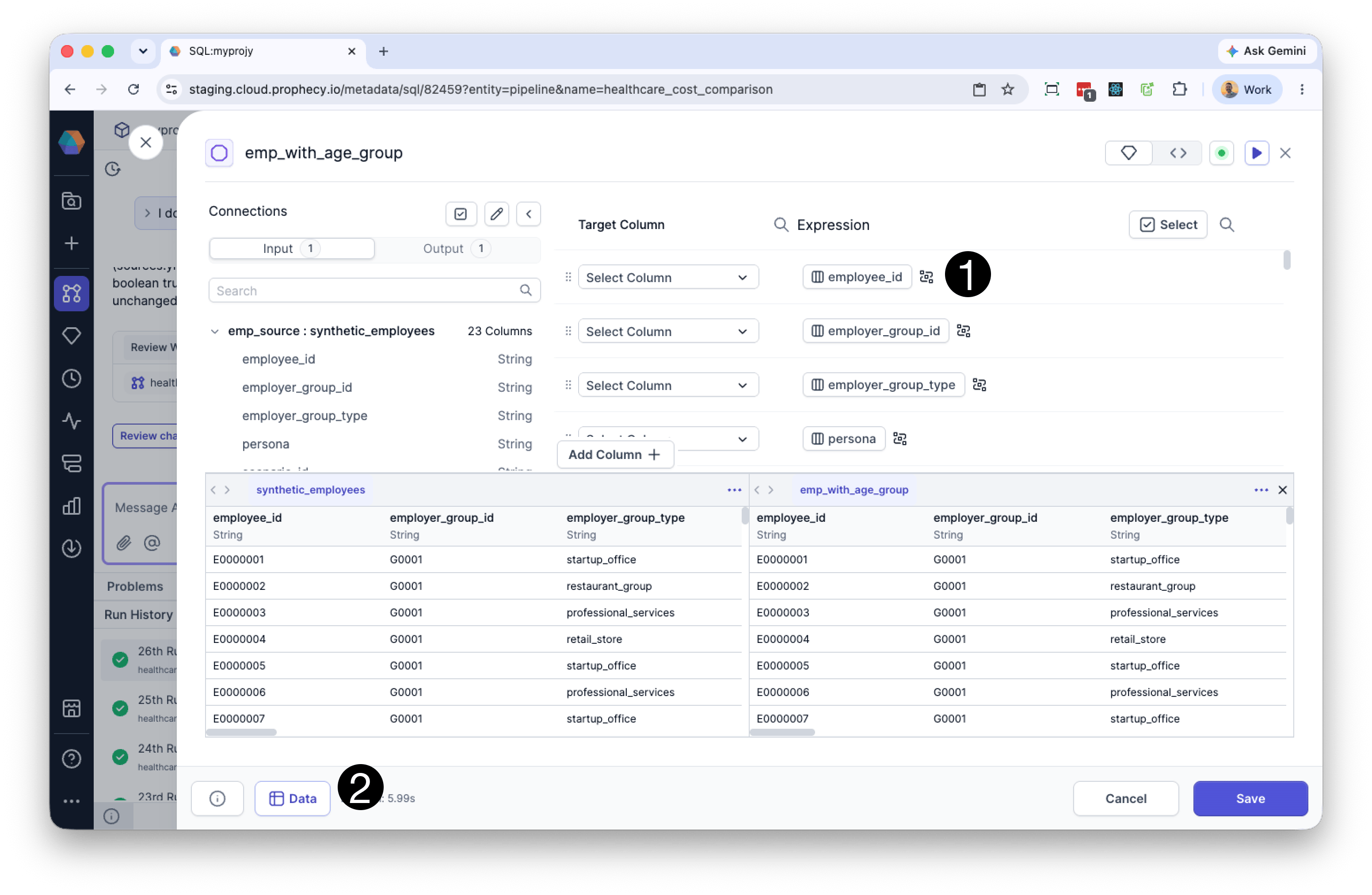
### Preview transformed data
Run the Reformat gem to generate preview results.
After the initial run, the **Data** tab displays how your transformations affect the output dataset. As you edit expressions, the preview updates automatically so you can immediately verify the results of your changes.
### Visualize data flow
You can preview the changes that the Reformat gem will make by either:
1. Clicking the the **Visualize Data Flow** icon to the right of an expression, or
2. Clicking the **Data** button at the bottom of the Reformat gem visual editor.
When enabled:
* Input columns referenced by the expression are highlighted in the input data preview.
* The output column produced by the expression is highlighted in the output preview highlights update automatically as you edit the expression.
This view helps you understand column dependencies and verify how output values are derived from source data.
You must run the Reformat gem at least once before preview data and data flow visualizations are available.
 ## Common issues
### Column not found
Verify that:
* The column name exists in the input dataset.
* The column name uses the correct capitalization.
* The column reference is spelled correctly.
### Type mismatch errors
Some functions and operators require specific data types.
For example:
* Numeric calculations require numeric columns.
* String functions require text values.
Use `CAST()` to convert values when needed.
### Null values causing unexpected results
Some expressions return `NULL` when one or more input values are `NULL`.
Use `COALESCE()` to replace null values with defaults.
### Duplicate column names
Output column names must be unique.
## Similar tools and concepts
The Reformat gem can be used to:
* rename columns
* create calculated fields
* modify existing column values
* select output columns
You may recognize similar behavior from:
* SQL `SELECT` expressions and aliases
* the Alteryx Formula and Select tools
* PySpark `select()` and `withColumn()`
* Pandas column transformations
## Common issues
### Column not found
Verify that:
* The column name exists in the input dataset.
* The column name uses the correct capitalization.
* The column reference is spelled correctly.
### Type mismatch errors
Some functions and operators require specific data types.
For example:
* Numeric calculations require numeric columns.
* String functions require text values.
Use `CAST()` to convert values when needed.
### Null values causing unexpected results
Some expressions return `NULL` when one or more input values are `NULL`.
Use `COALESCE()` to replace null values with defaults.
### Duplicate column names
Output column names must be unique.
## Similar tools and concepts
The Reformat gem can be used to:
* rename columns
* create calculated fields
* modify existing column values
* select output columns
You may recognize similar behavior from:
* SQL `SELECT` expressions and aliases
* the Alteryx Formula and Select tools
* PySpark `select()` and `withColumn()`
* Pandas column transformations