> ## Documentation Index
> Fetch the complete documentation index at: https://docs.prophecy.ai/llms.txt
> Use this file to discover all available pages before exploring further.
# Use Skills
> Use built-in AI skills for stratification, cross-deal comparison, CDM authoring, and spec generation
Structured Finance includes built-in *skills*: reusable capabilities that combine a set of prompts and domain logic into a single task the agent can carry out on request. For example, the `adhoc-strats` skill turns a plain-language question like "show me top 10 vehicle models by balance" into a full stratification query, without you having to build the aggregation yourself.
You can ask the Agent what's available:
```
what Structured Finance skills are available?
```
and it will return a list of built-in skills. You can also [add your own skills](#add-a-new-skill) or have the Agent create one for you.
## Built-in skills
| Skill | Trigger | Purpose |
| --------------- | ------------------------------------------------------------------ | ---------------------------------------------------------------------------------------------------------- |
| `harmonization` | "harmonize", "crack a tape", "map to CDM" | Map raw source data to a target CDM schema, edit mappings, fix DQ failures |
| `adhoc-strats` | "show me", "what's the distribution", "top 10", "weighted average" | Ad-hoc stratification queries on collateral pools — FICO, APR, LTV, state, vehicle, delinquency breakdowns |
| `asset-comp` | "asset comp", "compare deals", "extract comp", "research note" | Build and query cross-deal comparison tables, extract metrics from prospectuses, generate research notes |
| `cdm` | "create CDM table", "add column to CDM", "DQ checks" | Author and manage Common Data Model schemas with data quality rules |
| `livespec` | "generate spec", "create documentation" | Auto-generate pipeline and project specification documents |
These skills work across all supported Auto ABS deal types (GMCAR, SDART, BMWOT, TAOT, CALT, EART, and so on) and integrate with the harmonization and strats pipelines you're already using. Skills are customizable to your organization's needs.
When you confirm use of a skill, the Agent identifies the necessary steps and gems, executes them, and returns traceable results — for example, surfacing state or vintage-quarter concentrations to support a pool-cutting decision.
## Get the full cheat sheet for a skill
You can ask the Agent for all cheat sheet prompts:
```
adhoc Strats cheat sheet
```
The Agent then returns a list of prompts:
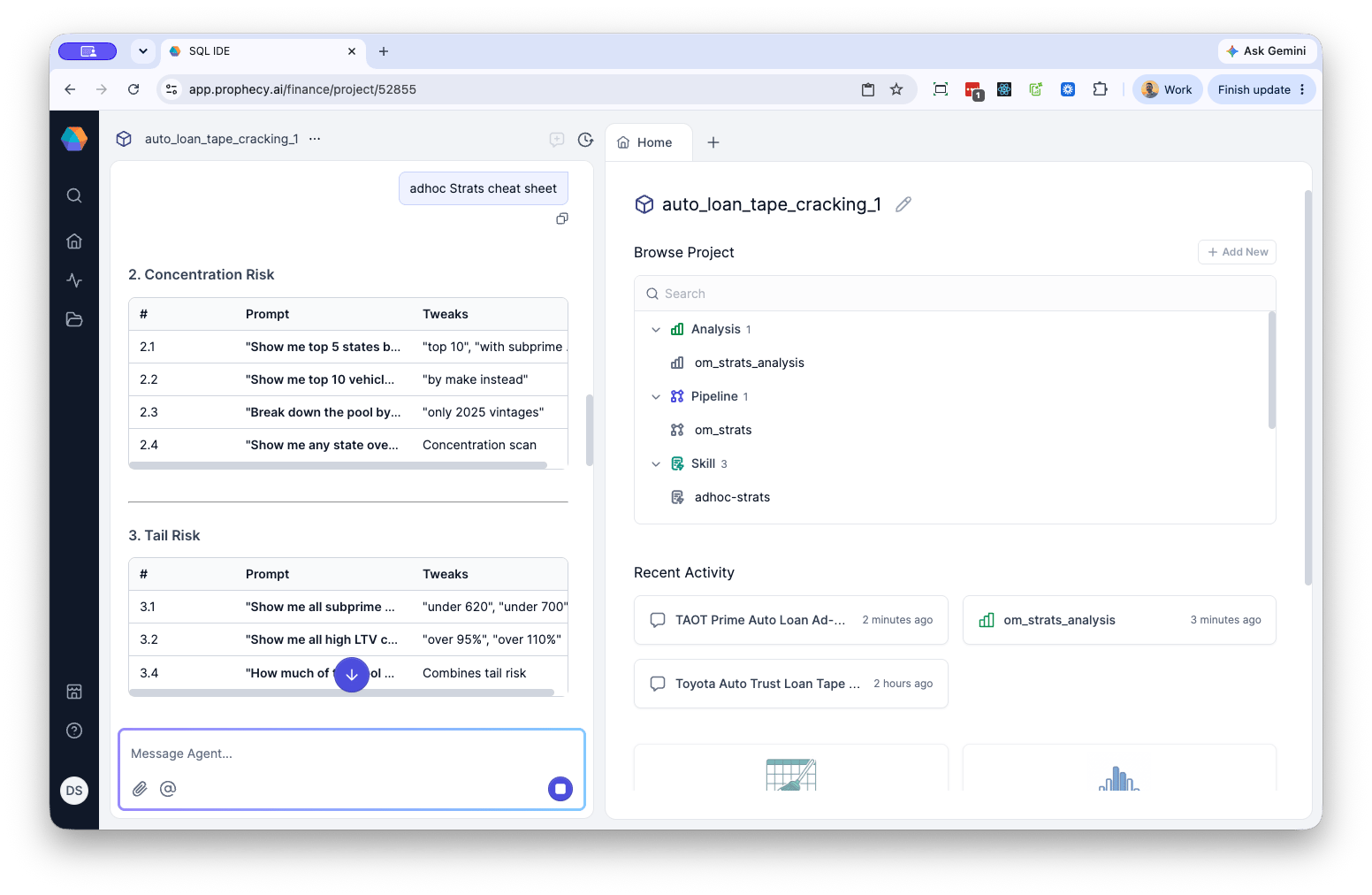 then run specific ones by reference:
```
2.1 "Show me top 5 states by balance with avg FICO and avg LTV"
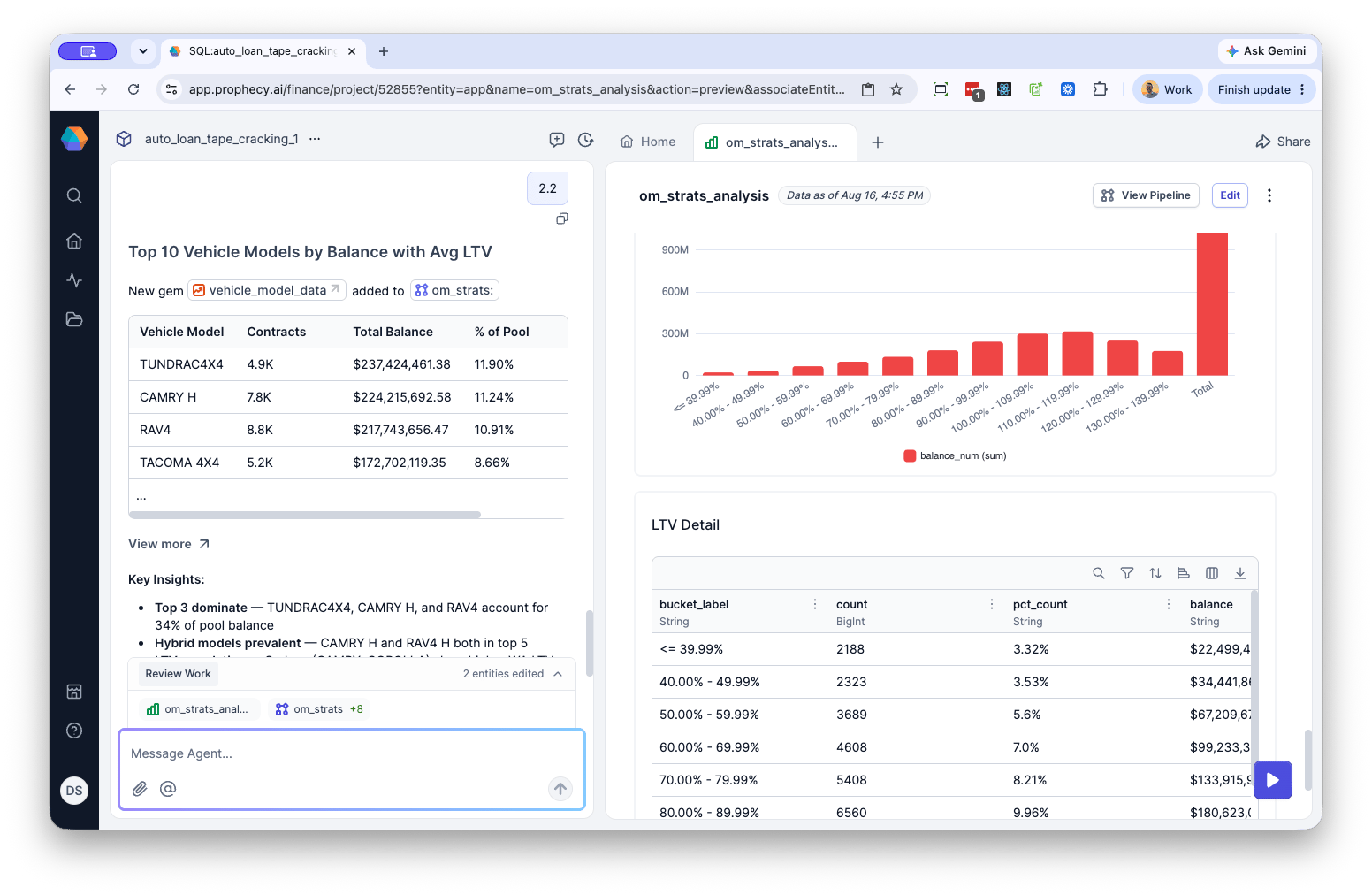
2.2 "Show me top 10 vehicle models by balance with avg LTV"
2.3 "Break down the pool by origination quarter with avg FICO and APR"
2.4 "Show me any state over 15% of balance, any model over 10%, any vintage over 40%"
```
You can then run a prompt directly by number — for example, `run 2.2`.
Running `2.2 Show me top 10 vehicle models by balance with avg LTV`, for example yields a result similar to the following:
then run specific ones by reference:
```
2.1 "Show me top 5 states by balance with avg FICO and avg LTV"
2.2 "Show me top 10 vehicle models by balance with avg LTV"
2.3 "Break down the pool by origination quarter with avg FICO and APR"
2.4 "Show me any state over 15% of balance, any model over 10%, any vintage over 40%"
```
You can then run a prompt directly by number — for example, `run 2.2`.
Running `2.2 Show me top 10 vehicle models by balance with avg LTV`, for example yields a result similar to the following:
 ## Ad-hoc stratification (`adhoc-strats`)
The `adhoc-strats` skill accepts natural-language prompts for exploring a loan pool. Prompts are organized around common analysis patterns:
* **Pool Health** — summary stats (contracts, balance, WA FICO/LTV/APR), credit tier splits, new/used breakdowns
* **Concentration Risk** — top states, vehicle models, and vintages by balance; concentration threshold flags
* **Tail Risk** — filtering to subprime FICO, high LTV, or combined tail segments
* **Stacked Risk** — multi-factor filters (e.g., FICO under a threshold AND LTV over a threshold)
* **Pricing Adequacy** — APR by credit tier, mispriced-risk detection, new vs. used APR spread
* **Delinquency & Performance** — DPD bucket breakdowns, delinquency by state or credit tier
Prompts support threshold tuning (e.g., "under 660" vs. "under 620"), percentage-of-pool framing, and dimension pivots (e.g., "by state" or "by vintage"). Thresholds for what counts as subprime, high LTV, or high APR vary by deal type — prime loan vs. subprime loan, loan vs. lease.
## Cross-deal comparison (`asset-comp`)
The `asset-comp` skill runs on any of these trigger phrases:
* `asset comp` / `add to comp` / `compare to other deals`
* `compare this tape` / `extract comp` / `insights on this deal`
* `write research note` / `collateral analysis` / `cross-deal comparison`
* `GMCAR comp` / `download prospectus` / `refresh comp`
### Operations
| Operation | What it does | Example prompt |
| ------------ | --------------------------------------------------- | ---------------------------------- |
| **extract** | Pull metrics from the current tape into comp format | "extract comp from this tape" |
| **add** | Add a deal to the comp table | "add SDART 2025-1 to comp" |
| **compare** | Cross-deal comparison against the comp table | "compare this tape to other deals" |
| **insight** | Generate insights on the current deal vs. peers | "insights on this deal" |
| **research** | Write a research note or collateral analysis | "write research note" |
### Input modes
1. **Harmonized CDM tape** — uses your current pipeline's `output_preview` data
2. **SEC prospectus** — downloads and parses prospectus PDFs (e.g., "download prospectus for GMCAR 2025-2")
### Example: extracting a comp
"extract comp from this tape" returns a preview — no changes are made to the comp table until you confirm:
#### SDART 2025-4 — Comp Extraction (Preview)
| Metric | Value |
| ------------ | --------------- |
| Pool Balance | \$2,034,742,702 |
| Loan Count | 65,867 |
| WA APR | 5.67% |
| WA FICO | 771 |
| WA LTV | 104.96% |
| New % | 87.98% |
Next steps from a preview:
* "add to comp" → insert into `cross_deal_comp.csv`
* "compare to others" → side-by-side with peer deals
* "insights on this deal" → full cross-deal analysis
Cross-deal comparison works because every tape is harmonized to the same CDM, which means that metrics line up without additional mapping. The Agent also self-retries on errors encountered during execution.
## Add a new skill
Built-in skills cover common workflows — harmonization, ad-hoc strats, cross-deal comparison — but you can add a skill scoped to your own team's practices.
For example, a desk might codify its own tail-risk definitions as a skill, since what counts as "subprime" or "high LTV" varies by deal type. A skill such as `desk-risk-thresholds` could encode your team's specific cutoffs and stress-test segments as a reusable prompt set, so anyone on the desk gets consistent results without re-specifying thresholds each time.
To add a new skill:
1. Click the **+**, then select **New Tab**, then select **Skill**.
2. In the dialog, enter a **Skill Name** and click **Create**.
3. On the new page, enter a description and content for the skill.
You can also ask the Agent to create a skill for you.
For more information on skills, see [Add and use skills](/data-analysis/ai/using-skills)
## Ad-hoc stratification (`adhoc-strats`)
The `adhoc-strats` skill accepts natural-language prompts for exploring a loan pool. Prompts are organized around common analysis patterns:
* **Pool Health** — summary stats (contracts, balance, WA FICO/LTV/APR), credit tier splits, new/used breakdowns
* **Concentration Risk** — top states, vehicle models, and vintages by balance; concentration threshold flags
* **Tail Risk** — filtering to subprime FICO, high LTV, or combined tail segments
* **Stacked Risk** — multi-factor filters (e.g., FICO under a threshold AND LTV over a threshold)
* **Pricing Adequacy** — APR by credit tier, mispriced-risk detection, new vs. used APR spread
* **Delinquency & Performance** — DPD bucket breakdowns, delinquency by state or credit tier
Prompts support threshold tuning (e.g., "under 660" vs. "under 620"), percentage-of-pool framing, and dimension pivots (e.g., "by state" or "by vintage"). Thresholds for what counts as subprime, high LTV, or high APR vary by deal type — prime loan vs. subprime loan, loan vs. lease.
## Cross-deal comparison (`asset-comp`)
The `asset-comp` skill runs on any of these trigger phrases:
* `asset comp` / `add to comp` / `compare to other deals`
* `compare this tape` / `extract comp` / `insights on this deal`
* `write research note` / `collateral analysis` / `cross-deal comparison`
* `GMCAR comp` / `download prospectus` / `refresh comp`
### Operations
| Operation | What it does | Example prompt |
| ------------ | --------------------------------------------------- | ---------------------------------- |
| **extract** | Pull metrics from the current tape into comp format | "extract comp from this tape" |
| **add** | Add a deal to the comp table | "add SDART 2025-1 to comp" |
| **compare** | Cross-deal comparison against the comp table | "compare this tape to other deals" |
| **insight** | Generate insights on the current deal vs. peers | "insights on this deal" |
| **research** | Write a research note or collateral analysis | "write research note" |
### Input modes
1. **Harmonized CDM tape** — uses your current pipeline's `output_preview` data
2. **SEC prospectus** — downloads and parses prospectus PDFs (e.g., "download prospectus for GMCAR 2025-2")
### Example: extracting a comp
"extract comp from this tape" returns a preview — no changes are made to the comp table until you confirm:
#### SDART 2025-4 — Comp Extraction (Preview)
| Metric | Value |
| ------------ | --------------- |
| Pool Balance | \$2,034,742,702 |
| Loan Count | 65,867 |
| WA APR | 5.67% |
| WA FICO | 771 |
| WA LTV | 104.96% |
| New % | 87.98% |
Next steps from a preview:
* "add to comp" → insert into `cross_deal_comp.csv`
* "compare to others" → side-by-side with peer deals
* "insights on this deal" → full cross-deal analysis
Cross-deal comparison works because every tape is harmonized to the same CDM, which means that metrics line up without additional mapping. The Agent also self-retries on errors encountered during execution.
## Add a new skill
Built-in skills cover common workflows — harmonization, ad-hoc strats, cross-deal comparison — but you can add a skill scoped to your own team's practices.
For example, a desk might codify its own tail-risk definitions as a skill, since what counts as "subprime" or "high LTV" varies by deal type. A skill such as `desk-risk-thresholds` could encode your team's specific cutoffs and stress-test segments as a reusable prompt set, so anyone on the desk gets consistent results without re-specifying thresholds each time.
To add a new skill:
1. Click the **+**, then select **New Tab**, then select **Skill**.
2. In the dialog, enter a **Skill Name** and click **Create**.
3. On the new page, enter a description and content for the skill.
You can also ask the Agent to create a skill for you.
For more information on skills, see [Add and use skills](/data-analysis/ai/using-skills)