> ## Documentation Index
> Fetch the complete documentation index at: https://docs.prophecy.ai/llms.txt
> Use this file to discover all available pages before exploring further.
# Secrets
> Store sensitive values in secret management systems
Available only in [Enterprise Edition](/data-engineering/administration/platform/editions).
A *secret* is sensitive information—such as an API key, password, or encryption key—that you want to use in a pipeline without exposing its value. Prophecy integrates with external [secret management systems](#secret-providers) to save those secrets securely, including, Databricks Secrets, HashiCorp Vault, and Spark environment variables.
To integrate secrets in Prophecy, you connect to these systems directly in your fabric. This ensures that the compute attached to that fabric can access the secret at runtime while keeping the value hidden from users. By linking secrets to fabrics, you can safely pass credentials and keys into Spark pipelines without hardcoding them.
## Access control
Secrets belong to the fabric where they are created. Anyone with access to the fabric can reference them in projects.
* Users can **use** secrets in gems or configurations.
* Users cannot **see** the raw secret values.
## Using secrets in pipelines
When a gem requires authentication fields (for example, username or password), you can insert a secret instead of entering plain text.
1. Click Insert Secret in the gem field. A dropdown lists all secrets from the selected fabric.
2. If a secret is missing, check the fabric selection (top-right corner).
3. Attach a cluster to enable Refresh Secrets for the provider.
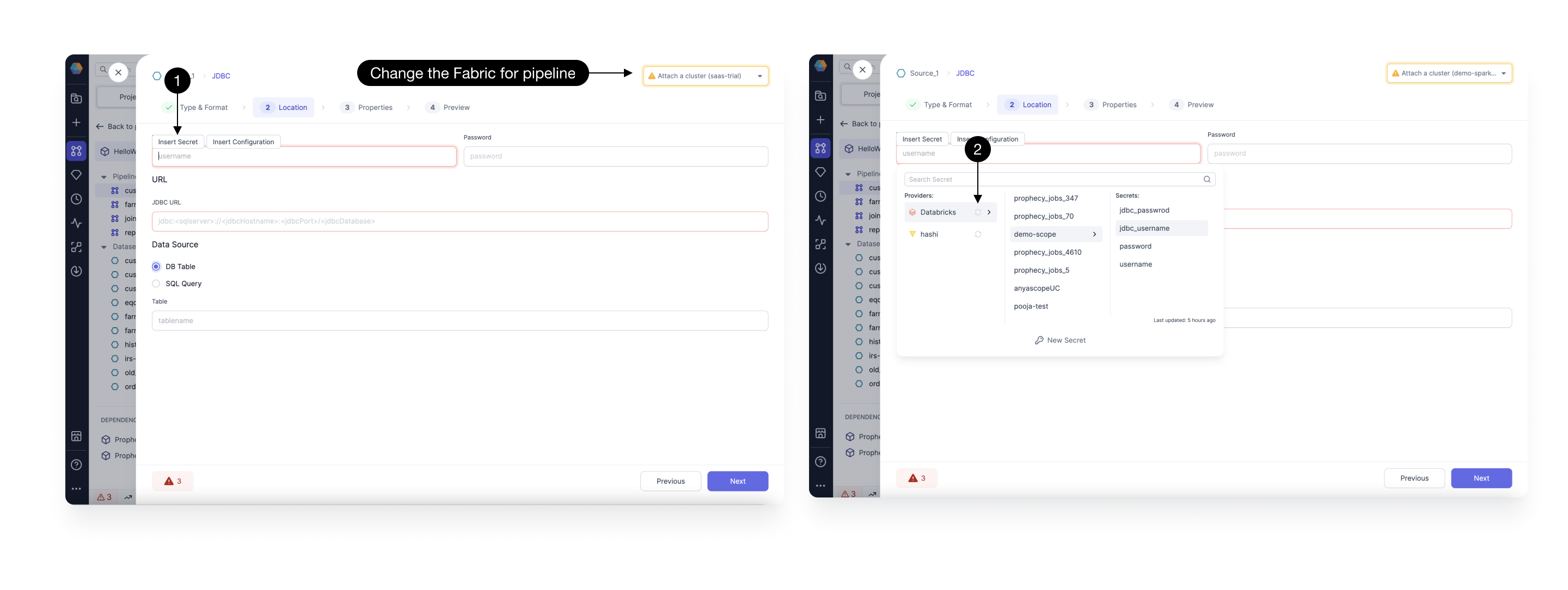 Typing credentials directly into fields triggers a warning diagnostic.
If you want to populate secrets dynamically in your pipeline, you can set up secrets in [pipeline
configurations](/data-engineering/development/pipelines/secrets-configs).
## Secret providers
Each fabric can be linked to one or more providers through the **Providers** tab. From Prophecy, you can add, edit, or remove both providers and secrets.
| Secret Provider | Details | Platform |
| --------------------- | ----------------------------------------------------------------- | ---------- |
| Databricks Secrets | Recommended if you are a Databricks user | Databricks |
| HashiCorp Vault | Recommended if your organization privileges HashiCorp Vault | Any Spark |
| Environment Variables | Recommended if your organization privileges environment variables | Any Spark |
If your organization uses another system, you can fetch secrets by calling its API from a
[Script](/data-engineering/gems/custom/script) gem, which runs PySpark code.
### Databricks
[Databricks](https://docs.databricks.com/en/security/secrets/index.html) is the most commonly used secret provider in Prophecy. By default, a Databricks secret provider is added to all Databricks fabrics. You can remove this if required.
If you add new secrets in Databricks, you can refresh secrets in Prophecy to fetch them. You can also add new secrets directly in Prophecy. To refresh or add secrets, you must be attached to a cluster. You can only access secrets that you also can access in Databricks.
If you are using a free trial Databricks fabric, you can use Databricks as the secret provider.
Your secrets will be automatically cleaned up after the trial expires. While Prophecy assigns a
separate scope to each trial fabric, it is not recommended to use your production data tools for
trials.
### HashiCorp Vault
Prophecy supports [HashiCorp Vault](https://developer.hashicorp.com/vault/docs/what-is-vault) as a secret provider. When you set up HashiCorp Vault, you'll see a few additional configuration fields.
* **Namespace**: An optional field to specify the namespace within a multi-tenant Vault.
* **Address**: Auto-filled from Spark cluster. You must first set up a `VAULT_ADDR` environment variable in the Spark cluster.
* **Token**: Auto-filled from Spark cluster. You must first set up a `VAULT_TOKEN` environment variable in the Spark cluster.
If you add new secrets to your vault, you can refresh secrets in Prophecy to fetch them. You can also add new secrets directly in Prophecy. To refresh or add secrets, you must be attached to a cluster. You can only access secrets that you also have access to in your Spark cluster.
#### Mount paths with slashes
If your root mount name contains one or more slashes (`/`), you must provide the allowed secret path with a double slash (`//`) after the root mount.
**Example 1: Root mount with slashes**
```
secret/apps/team-a (root mount)
└── db-config
└── prod
```
Allowed secret path: `secret/apps/team-a//db-config/prod`
Note the double slash (`//`) after `team-a`.
**Example 2: Root mount without slashes**
```
secret (root mount)
└── app1
└── db-config
└── prod
```
Allowed secret path: `secret/app1/db-config/prod`
No double slash is needed when the root mount does not contain slashes.
### Environment variables
If you prefer a simple way to manage secrets, you can use environment variables available in your Spark cluster. To do so:
1. Add a new secret provider and choose **Environment**.
2. Add a new secret. Prophecy will automatically map this secret to an environment variable in your Spark cluster.
3. Verify that the new environment variable exists in your Spark cluster with the correct value.
This method does not support refreshing or fetching secrets.
Typing credentials directly into fields triggers a warning diagnostic.
If you want to populate secrets dynamically in your pipeline, you can set up secrets in [pipeline
configurations](/data-engineering/development/pipelines/secrets-configs).
## Secret providers
Each fabric can be linked to one or more providers through the **Providers** tab. From Prophecy, you can add, edit, or remove both providers and secrets.
| Secret Provider | Details | Platform |
| --------------------- | ----------------------------------------------------------------- | ---------- |
| Databricks Secrets | Recommended if you are a Databricks user | Databricks |
| HashiCorp Vault | Recommended if your organization privileges HashiCorp Vault | Any Spark |
| Environment Variables | Recommended if your organization privileges environment variables | Any Spark |
If your organization uses another system, you can fetch secrets by calling its API from a
[Script](/data-engineering/gems/custom/script) gem, which runs PySpark code.
### Databricks
[Databricks](https://docs.databricks.com/en/security/secrets/index.html) is the most commonly used secret provider in Prophecy. By default, a Databricks secret provider is added to all Databricks fabrics. You can remove this if required.
If you add new secrets in Databricks, you can refresh secrets in Prophecy to fetch them. You can also add new secrets directly in Prophecy. To refresh or add secrets, you must be attached to a cluster. You can only access secrets that you also can access in Databricks.
If you are using a free trial Databricks fabric, you can use Databricks as the secret provider.
Your secrets will be automatically cleaned up after the trial expires. While Prophecy assigns a
separate scope to each trial fabric, it is not recommended to use your production data tools for
trials.
### HashiCorp Vault
Prophecy supports [HashiCorp Vault](https://developer.hashicorp.com/vault/docs/what-is-vault) as a secret provider. When you set up HashiCorp Vault, you'll see a few additional configuration fields.
* **Namespace**: An optional field to specify the namespace within a multi-tenant Vault.
* **Address**: Auto-filled from Spark cluster. You must first set up a `VAULT_ADDR` environment variable in the Spark cluster.
* **Token**: Auto-filled from Spark cluster. You must first set up a `VAULT_TOKEN` environment variable in the Spark cluster.
If you add new secrets to your vault, you can refresh secrets in Prophecy to fetch them. You can also add new secrets directly in Prophecy. To refresh or add secrets, you must be attached to a cluster. You can only access secrets that you also have access to in your Spark cluster.
#### Mount paths with slashes
If your root mount name contains one or more slashes (`/`), you must provide the allowed secret path with a double slash (`//`) after the root mount.
**Example 1: Root mount with slashes**
```
secret/apps/team-a (root mount)
└── db-config
└── prod
```
Allowed secret path: `secret/apps/team-a//db-config/prod`
Note the double slash (`//`) after `team-a`.
**Example 2: Root mount without slashes**
```
secret (root mount)
└── app1
└── db-config
└── prod
```
Allowed secret path: `secret/app1/db-config/prod`
No double slash is needed when the root mount does not contain slashes.
### Environment variables
If you prefer a simple way to manage secrets, you can use environment variables available in your Spark cluster. To do so:
1. Add a new secret provider and choose **Environment**.
2. Add a new secret. Prophecy will automatically map this secret to an environment variable in your Spark cluster.
3. Verify that the new environment variable exists in your Spark cluster with the correct value.
This method does not support refreshing or fetching secrets.