> ## Documentation Index
> Fetch the complete documentation index at: https://docs.prophecy.ai/llms.txt
> Use this file to discover all available pages before exploring further.
# Delta
> Parameters and properties to read from and write to Delta files
Dependencies:
* ProphecySparkBasicsPython 0.0.1+
* ProphecySparkBasicsScala 0.0.1+
Cluster requirements:
* UC dedicated clusters 14.3+ supported
* UC standard clusters 14.3+ supported
* Livy clusters not supported
A Delta (Delta Lake) file type:
* Is an optimized storage layer that allows you to store data and tables in the Databricks lakehouse.
* Extends Parquet data files with a file-based transaction log for ACID transactions and scalable metadata handling.
* Has a tight integration with structured streaming, which allows you to use a single copy of data for both batch and streaming operations and provides incremental processing at scale.
## Parameters
| Parameter | Tab | Description |
| --------- | ---------- | --------------------------------------------------------------------------------------------------------------------------------------------------------------------------------------- |
| Location | Location | File path to read from or write to the Delta file. |
| Schema | Properties | Schema to apply on the loaded data. In the Source gem, you can define or edit the schema visually or in JSON code. In the Target gem, you can view the schema visually or as JSON code. |
## Source
The Source gem reads data from Delta files and allows you to optionally specify the following additional properties.
### Source properties
| Property name | Description | Default |
| -------------- | --------------------------------------------------------------------------------------------------------------------------------------------------------------------------------------------------------------------------------------------- | ------- |
| Description | Description of your dataset. | None |
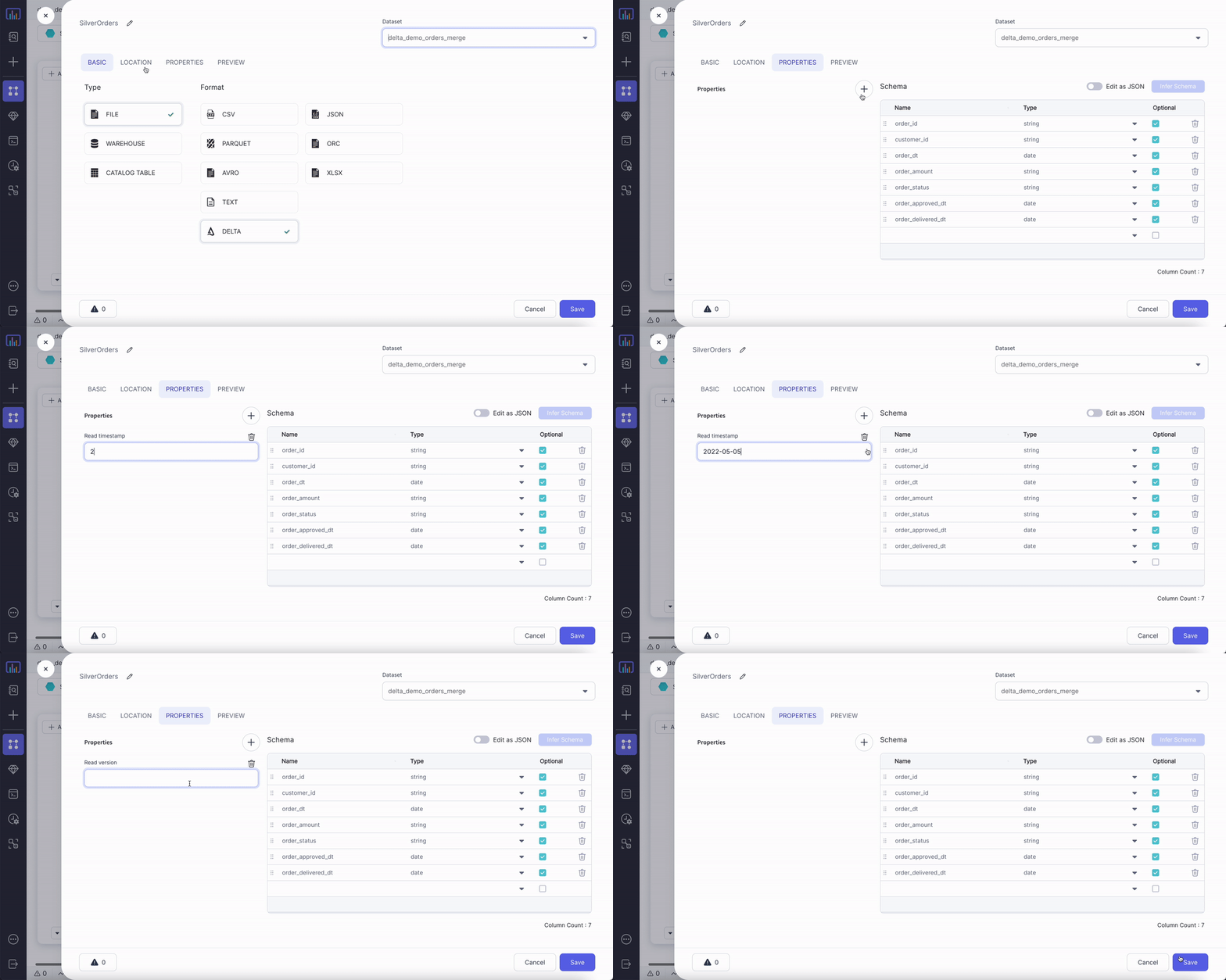
| Read timestamp | Time travel to a specific timestamp. This value is between the first commit timestamp and the latest commit timestamp in the table. | None |
| Read version | Time travel to a specific version of the table. This value is an interger between the minimum and maximum version of the table. By default, the Source gem fetches the most recent version of each row if you don't use a time travel option. | None |
You can only select `Read Timestamp` or `Read Version`, not both.
### Example
 ### Compiled code
To see the compiled code of your project, [switch to the Code
view](/data-engineering/development/pipelines/pipelines#project-editor) in the project header.
#### Without time travel
```python example.py theme={null}
def ReadDelta(spark: SparkSession) -> DataFrame:
return spark.read.format("delta").load("dbfs:/FileStore/data_engg/delta_demo/silver/orders")
```
```scala example.scala theme={null}
object ReadDelta {
def apply(spark: SparkSession): DataFrame = {
spark.read.format("delta").load("dbfs:/FileStore/data_engg/delta_demo/silver/orders")
}
}
```
#### Timestamp-based time travel
```python example.py theme={null}
def ReadDelta(spark: SparkSession) -> DataFrame:
return spark.read.format("delta").option("timestampAsOf", "2022-05-05")\
.load("dbfs:/FileStore/data_engg/delta_demo/silver/orders")
```
```scala example.scala theme={null}
object ReadDelta {
def apply(spark: SparkSession): DataFrame = {
spark.read.format("delta").option("timestampAsOf", "2022-05-05")
.load("dbfs:/FileStore/data_engg/delta_demo/silver/orders")
}
}
```
#### Version-based time travel
```python example.py theme={null}
def readDelta(spark: SparkSession) -> DataFrame:
return spark.read.format("delta").option("versionAsOf", "0")\
.load("dbfs:/FileStore/data_engg/delta_demo/silver/orders")
```
```scala example.scala theme={null}
object readDelta {
def apply(spark: SparkSession): DataFrame = {
spark.read.format("delta").option("versionAsOf", "0")
.load("dbfs:/FileStore/data_engg/delta_demo/silver/orders")
}
}
```
***
## Target
The Target gem writes data to Delta files and allows you to optionally specify the following additional properties.
### Target properties
| Property name | Description | Default |
| ------------------------------------------ | -------------------------------------------------------------------------------------------------------------------------------------------------------- | ------- |
| Description | Description of your dataset. | None |
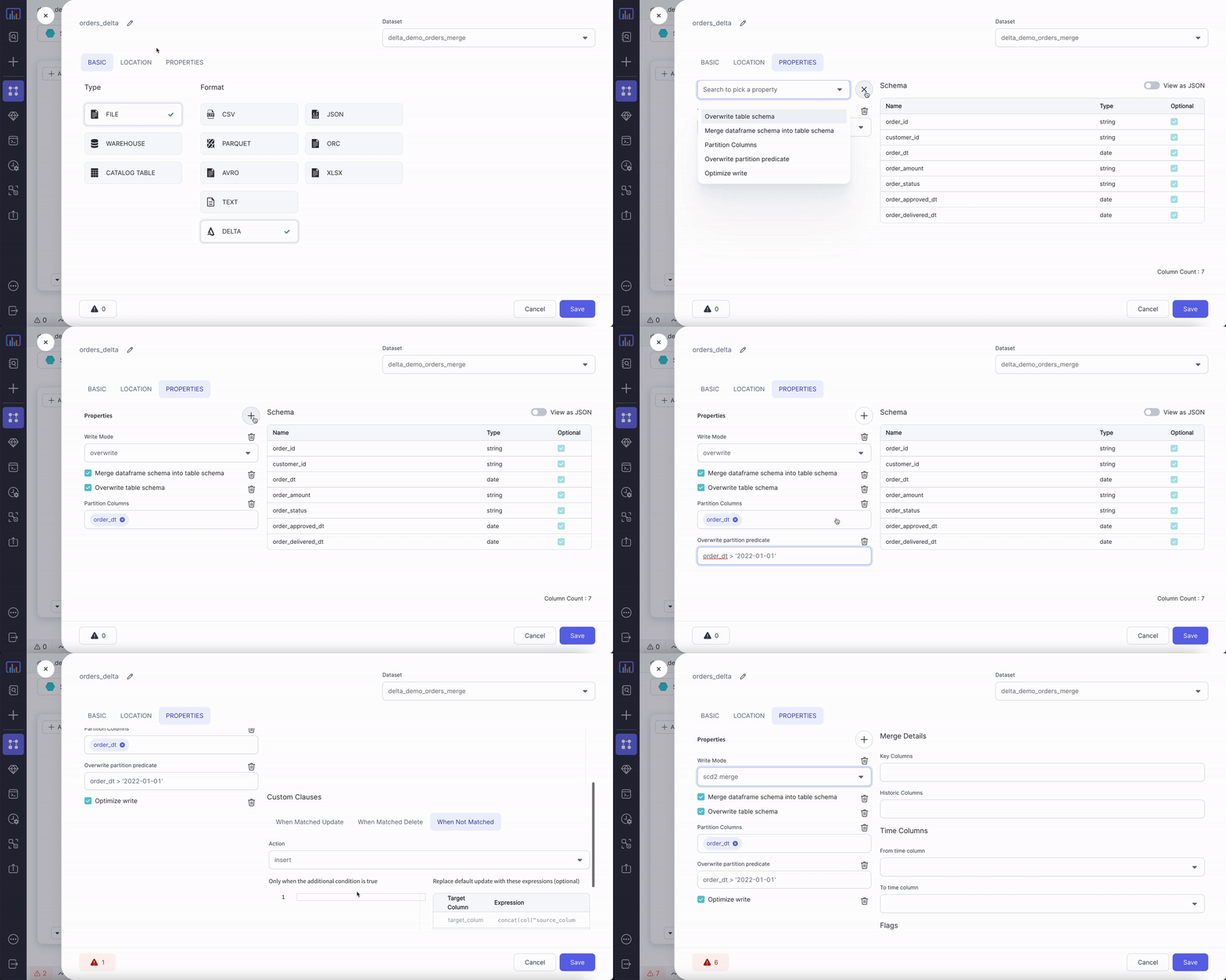
| Write Mode | How to handle existing data. For a list of the possible values, see [Supported write modes](#supported-write-modes). | `error` |
| Overwrite table schema | Whether to overwrite the schema of the Delta table with the schema of the incoming `DataFrame`. | false |
| Merge `DataFrame` schema into table schema | Whether to automatically add any columns present in the `DataFrame` but not in the target table to the end of the schema as part of a write transaction. | false |
| Partition Columns | List of columns to partition the Delta table by. | None |
| Overwrite partition predicate | Selectively overwrite the data that satisfies the given where clause expression. | None |
| Optimize write | Whether to optimize the Spark partition sizes based on the actual data. | false |
### Supported write modes
| Write mode | Description |
| ---------- | ----------------------------------------------------------------------------------------------------------------------------------------------- |
| error | If the data already exists, throw an exception. |
| overwrite | If the data already exists, overwrite the data with the contents of the `DataFrame`. |
| append | If the data already exists, append the contents of the `DataFrame`. |
| ignore | If the data already exists, do nothing with the contents of the `DataFrame`. This is similar to the `CREATE TABLE IF NOT EXISTS` clause in SQL. |
| merge | Use the Delta `merge` command to insert, delete and update data. For more information, see [Delta MERGE](#delta-merge). |
| scd2 merge | Store and manage the current and historical data over time. For more information, see [Delta MERGE](#delta-merge). |
### Target Example
### Compiled code
To see the compiled code of your project, [switch to the Code
view](/data-engineering/development/pipelines/pipelines#project-editor) in the project header.
#### Without time travel
```python example.py theme={null}
def ReadDelta(spark: SparkSession) -> DataFrame:
return spark.read.format("delta").load("dbfs:/FileStore/data_engg/delta_demo/silver/orders")
```
```scala example.scala theme={null}
object ReadDelta {
def apply(spark: SparkSession): DataFrame = {
spark.read.format("delta").load("dbfs:/FileStore/data_engg/delta_demo/silver/orders")
}
}
```
#### Timestamp-based time travel
```python example.py theme={null}
def ReadDelta(spark: SparkSession) -> DataFrame:
return spark.read.format("delta").option("timestampAsOf", "2022-05-05")\
.load("dbfs:/FileStore/data_engg/delta_demo/silver/orders")
```
```scala example.scala theme={null}
object ReadDelta {
def apply(spark: SparkSession): DataFrame = {
spark.read.format("delta").option("timestampAsOf", "2022-05-05")
.load("dbfs:/FileStore/data_engg/delta_demo/silver/orders")
}
}
```
#### Version-based time travel
```python example.py theme={null}
def readDelta(spark: SparkSession) -> DataFrame:
return spark.read.format("delta").option("versionAsOf", "0")\
.load("dbfs:/FileStore/data_engg/delta_demo/silver/orders")
```
```scala example.scala theme={null}
object readDelta {
def apply(spark: SparkSession): DataFrame = {
spark.read.format("delta").option("versionAsOf", "0")
.load("dbfs:/FileStore/data_engg/delta_demo/silver/orders")
}
}
```
***
## Target
The Target gem writes data to Delta files and allows you to optionally specify the following additional properties.
### Target properties
| Property name | Description | Default |
| ------------------------------------------ | -------------------------------------------------------------------------------------------------------------------------------------------------------- | ------- |
| Description | Description of your dataset. | None |
| Write Mode | How to handle existing data. For a list of the possible values, see [Supported write modes](#supported-write-modes). | `error` |
| Overwrite table schema | Whether to overwrite the schema of the Delta table with the schema of the incoming `DataFrame`. | false |
| Merge `DataFrame` schema into table schema | Whether to automatically add any columns present in the `DataFrame` but not in the target table to the end of the schema as part of a write transaction. | false |
| Partition Columns | List of columns to partition the Delta table by. | None |
| Overwrite partition predicate | Selectively overwrite the data that satisfies the given where clause expression. | None |
| Optimize write | Whether to optimize the Spark partition sizes based on the actual data. | false |
### Supported write modes
| Write mode | Description |
| ---------- | ----------------------------------------------------------------------------------------------------------------------------------------------- |
| error | If the data already exists, throw an exception. |
| overwrite | If the data already exists, overwrite the data with the contents of the `DataFrame`. |
| append | If the data already exists, append the contents of the `DataFrame`. |
| ignore | If the data already exists, do nothing with the contents of the `DataFrame`. This is similar to the `CREATE TABLE IF NOT EXISTS` clause in SQL. |
| merge | Use the Delta `merge` command to insert, delete and update data. For more information, see [Delta MERGE](#delta-merge). |
| scd2 merge | Store and manage the current and historical data over time. For more information, see [Delta MERGE](#delta-merge). |
### Target Example
 ### Compiled code
To see the compiled code of your project, [switch to the Code
view](/data-engineering/development/pipelines/pipelines#project-editor) in the project header.
```python example.py theme={null}
def writeDelta(spark: SparkSession, in0: DataFrame):
return in0.write\
.format("delta")\
.option("optimizeWrite", True)\
.option("mergeSchema", True)\
.option("replaceWhere", "order_dt > '2022-01-01'")\
.option("overwriteSchema", True)\
.mode("overwrite")\
.partitionBy("order_dt")\
.save("dbfs:/FileStore/data_engg/delta_demo/silver/orders")
```
```scala example.scala theme={null}
object writeDelta {
def apply(spark: SparkSession, in: DataFrame): Unit = {
in0.write
.format("delta")
.option("optimizeWrite", True)
.option("mergeSchema", True)
.option("replaceWhere", "order_dt > '2022-01-01'")
.option("overwriteSchema", True)
.mode("overwrite")
.partitionBy("order_dt")
.save("dbfs:/FileStore/data_engg/delta_demo/silver/orders")
}
}
```
***
## Delta MERGE
You can upsert data from a source `DataFrame` into a target Delta table by using the [MERGE](https://docs.delta.io/latest/delta-update.html#upsert-into-a-table-using-merge) operation. Delta MERGE supports `Insert`, `Update`, and `Delete` operations and modifies records of the most common slowly changing dimension (SCD) cases in one of the following ways:
* [SCD1](#scd1): Delta tables do not retain history.
* [SCD2](#scd2): Delta tables retain history at the row level.
* [SCD3](#scd3): Delta tables retain history at the column level.
### SCD1
The following lists the properties in an SCD1 MERGE condition where Delta tables do not retain historical data.
#### Properties
| Property name | Description | Default |
| ------------------------------- | ---------------------------------------------------------------------------------------------------------------------------------------------------------------------------------------------------------------------------------------------------------------------------------------------------------------------------------------------------------------------------------------------------------------------------------------------- | -------- |
| Source Alias | Alias to use for the source `DataFrame`. | `source` |
| Target Alias | Alias to use for existing target Delta table. | `taret` |
| Merge condition | Condition to merge data from source `DataFrame` to target table. Delta can perform an update, delete, or insert action. | None |
| When Matched Update Action | Update the row from your Source gem that exists in your Target gem based on your `When Matched Update Condition` property. | `update` |
| When Matched Update Condition | Additional condition for updating a row. If you specify a condition, it must evaluate to `true` for the Target gem to update the row. | None |
| When Matched Update Expressions | Expressions for setting the values of columns that the Target gem needs to update.
### Compiled code
To see the compiled code of your project, [switch to the Code
view](/data-engineering/development/pipelines/pipelines#project-editor) in the project header.
```python example.py theme={null}
def writeDelta(spark: SparkSession, in0: DataFrame):
return in0.write\
.format("delta")\
.option("optimizeWrite", True)\
.option("mergeSchema", True)\
.option("replaceWhere", "order_dt > '2022-01-01'")\
.option("overwriteSchema", True)\
.mode("overwrite")\
.partitionBy("order_dt")\
.save("dbfs:/FileStore/data_engg/delta_demo/silver/orders")
```
```scala example.scala theme={null}
object writeDelta {
def apply(spark: SparkSession, in: DataFrame): Unit = {
in0.write
.format("delta")
.option("optimizeWrite", True)
.option("mergeSchema", True)
.option("replaceWhere", "order_dt > '2022-01-01'")
.option("overwriteSchema", True)
.mode("overwrite")
.partitionBy("order_dt")
.save("dbfs:/FileStore/data_engg/delta_demo/silver/orders")
}
}
```
***
## Delta MERGE
You can upsert data from a source `DataFrame` into a target Delta table by using the [MERGE](https://docs.delta.io/latest/delta-update.html#upsert-into-a-table-using-merge) operation. Delta MERGE supports `Insert`, `Update`, and `Delete` operations and modifies records of the most common slowly changing dimension (SCD) cases in one of the following ways:
* [SCD1](#scd1): Delta tables do not retain history.
* [SCD2](#scd2): Delta tables retain history at the row level.
* [SCD3](#scd3): Delta tables retain history at the column level.
### SCD1
The following lists the properties in an SCD1 MERGE condition where Delta tables do not retain historical data.
#### Properties
| Property name | Description | Default |
| ------------------------------- | ---------------------------------------------------------------------------------------------------------------------------------------------------------------------------------------------------------------------------------------------------------------------------------------------------------------------------------------------------------------------------------------------------------------------------------------------- | -------- |
| Source Alias | Alias to use for the source `DataFrame`. | `source` |
| Target Alias | Alias to use for existing target Delta table. | `taret` |
| Merge condition | Condition to merge data from source `DataFrame` to target table. Delta can perform an update, delete, or insert action. | None |
| When Matched Update Action | Update the row from your Source gem that exists in your Target gem based on your `When Matched Update Condition` property. | `update` |
| When Matched Update Condition | Additional condition for updating a row. If you specify a condition, it must evaluate to `true` for the Target gem to update the row. | None |
| When Matched Update Expressions | Expressions for setting the values of columns that the Target gem needs to update.
If you add some expressions, enable the **Update Remaining Columns from Source** checkbox to also update all remaining columns from the source `DataFrame`. | None |
| When Matched Delete Action | Delete rows if your `When Matched Delete Condition` property and the optional additional condition evaluates to `true`.
Delete removes the data from the latest version of the Delta table but does not remove it from the physical storage until you explicitily vacuum the old versions. To learn more, see [Remove files no longer referenced by a Delta table](https://docs.delta.io/latest/delta-utility.html#-delta-vacuum). | `ignore` |
| When Matched Delete Condition | Additional condition for deleting a row. If you specify a condition, it must evaluate to `true` for the Target gem to delete the row. | False |
| When Not Matched Action | Action to perform if the row from your Source gem is not present in your Target gem based on your `When Not Matched Condition` property. | `insert` |
| When Not Matched Condition | Condition for inserting a row. If you specify a condition, it must evaluate to `true` for the Target gem to insert a new row. | None |
| When Not Matched Expressions | Expressions for setting the values of columns that the Target gem needs to update. | None |
1. You must set at least one action out of update, delete or insert.
2. A merge operation fails if multiple rows of the source `DataFrame` matches and the merge attempts to update the same rows of the target Delta table. You can place deduplicate gems before your Target gem if you expect duplicate rows in your Source gem.
When possible, provide predicates on the partition columns for a partitioned Delta table because
predicates can significantly speed up the operations.
#### Example
Assume you have the following customers table:
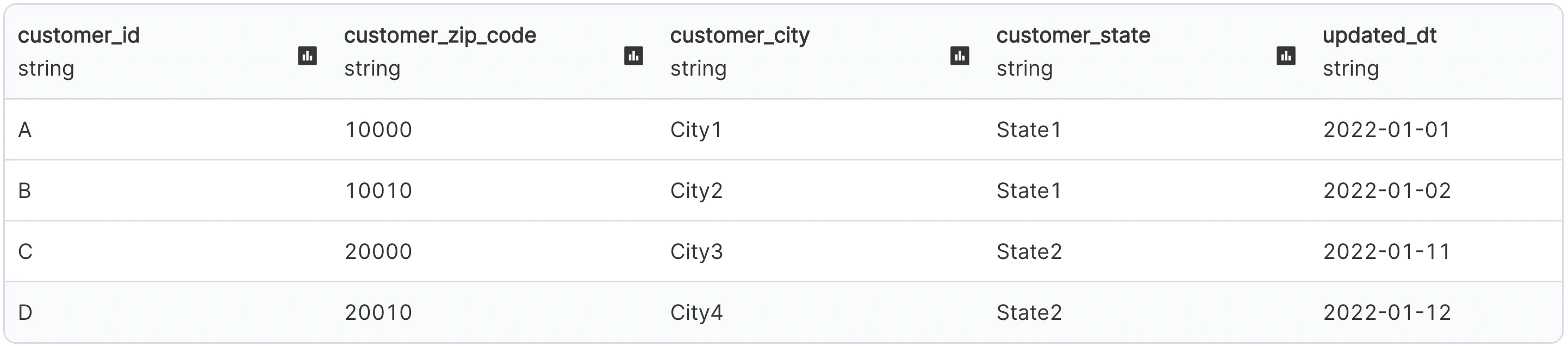 And, you want to make the following updates to the table:
 The following shows the output and configurations for an SCD1 merge:
#### Compiled code
To see the compiled code of your project, [switch to the Code
view](/data-engineering/development/pipelines/pipelines#project-editor) in the project header.
```python example.py theme={null}
def writeDeltaMerge(spark: SparkSession, in0: DataFrame):
from delta.tables import DeltaTable, DeltaMergeBuilder
if DeltaTable.isDeltaTable(spark, "dbfs:/FileStore/data_engg/delta_demo/silver/customers_scd1"):
DeltaTable\
.forPath(spark, "dbfs:/FileStore/data_engg/delta_demo/silver/customers_scd1")\
.alias("target")\
.merge(in0.alias("source"), (col("source.customer_id") == col("target.customer_id")))\
.whenMatchedUpdateAll()\
.whenNotMatchedInsertAll()\
.execute()
else:
in0.write\
.format("delta")\
.mode("overwrite")\
.save("dbfs:/FileStore/data_engg/delta_demo/silver/customers_scd1")
```
```scala example.scala theme={null}
object writeDeltaMerge {
def apply(spark: SparkSession, in: DataFrame): Unit = {
import _root_.io.delta.tables._
if (DeltaTable.isDeltaTable(spark, "dbfs:/FileStore/data_engg/delta_demo/silver/customers_scd1")) {
DeltaTable
.forPath(spark, "dbfs:/FileStore/data_engg/delta_demo/silver/customers_scd1")
.as("target")
.merge(in0.as("source"), (col("source.customer_id") === col("target.customer_id")))
.whenMatched()
.updateAll()
.whenNotMatched()
.insertAll()
.execute()
}
else {
in0.write
.format("delta")
.mode("overwrite")
.save("dbfs:/FileStore/data_engg/delta_demo/silver/customers_scd1")
}
}
}
```
***
### SCD2
The following lists the properties in an SCD2 MERGE condition where Delta tables retain history at the row level.
#### Parameters
| Property name | Description | Default |
| --------------------------------------------- | ---------------------------------------------------------------------------- | ------- |
| Key Columns | List of key columns to remain constant. | None |
| Historic Columns | List of columns to change over time and maintain its history. | None |
| From time column | Time from which a particular row is valid. | None |
| To time column | Time till which a particular row is not valid anymore. | None |
| Name of the column used as min/old-value flag | Column to store the flag as `true` for the first entry of a particular key. | None |
| Name of the column used as max/latest flag | Column to store the flag as `true` for the last entry of a particular key. | None |
| Flag values | Format of the min and max flag. Possible values are: `true/false`, or `0/1`. | None |
#### Example
Continuing from [the SCD1 example](#upsert-example), you can use the Delta log to capture the historical `customer_zip_code` at the row-level.
The following shows the output and configurations for an SCD2 merge:
#### Compiled code
To see the compiled code of your project, [switch to the Code
view](/data-engineering/development/pipelines/pipelines#project-editor) in the project header.
```python example.py theme={null}
def writeDeltaSCD2(spark: SparkSession, in0: DataFrame):
from delta.tables import DeltaTable, DeltaMergeBuilder
if DeltaTable.isDeltaTable(spark, "dbfs:/FileStore/data_engg/delta_demo/silver/customers_scd2"):
existingTable = DeltaTable.forPath(
spark, "dbfs:/FileStore/data_engg/delta_demo/silver/customers_scd2"
)
updatesDF = in0.withColumn("minFlag", lit("true")).withColumn(
"maxFlag", lit("true")
)
existingDF = existingTable.toDF()
updateColumns = updatesDF.columns
stagedUpdatesDF = (
updatesDF.join(existingDF, ["customer_id"])
.where(
(
(existingDF["maxFlag"] == lit("true"))
& (
(
(
existingDF["customer_zip_code"]
!= updatesDF["customer_zip_code"]
)
| (
existingDF["customer_city"]
!= updatesDF["customer_city"]
)
)
| (existingDF["customer_state"] != updatesDF["customer_state"])
)
)
)
.select(*[updatesDF[val] for val in updateColumns])
.withColumn("minFlag", lit("false"))
.withColumn("mergeKey", lit(None))
.union(updatesDF.withColumn("mergeKey", concat("customer_id")))
)
existingTable.alias("existingTable").merge(
stagedUpdatesDF.alias("staged_updates"),
concat(existingDF["customer_id"]) == stagedUpdatesDF["mergeKey"],
).whenMatchedUpdate(
condition=(
(existingDF["maxFlag"] == lit("true"))
& (
(
(
existingDF["customer_zip_code"]
!= stagedUpdatesDF["customer_zip_code"]
)
| (
existingDF["customer_city"]
!= stagedUpdatesDF["customer_city"]
)
)
| (
existingDF["customer_state"]
!= stagedUpdatesDF["customer_state"]
)
)
),
set={"maxFlag": "false", "end_date": "staged_updates.updated_dt"},
)\
.whenNotMatchedInsertAll()\
.execute()
else:
in0.write\
.format("delta")\
.mode("overwrite")\
.save("dbfs:/FileStore/data_engg/delta_demo/silver/customers_scd2")
```
```scala example.scala theme={null}
object writeDeltaSCD2 {
def apply(spark: SparkSession, in: DataFrame): Unit = {
import _root_.io.delta.tables._
if (
DeltaTable.isDeltaTable(
spark,
"dbfs:/FileStore/data_engg/delta_demo/silver/customers_scd2"
)
) {
val updatesDF = in
.withColumn("minFlag", lit("true"))
.withColumn("maxFlag", lit("true"))
val existingTable: DeltaTable = DeltaTable.forPath(
spark,
"dbfs:/FileStore/data_engg/delta_demo/silver/customers_scd2"
)
val existingDF: DataFrame = existingTable.toDF
val stagedUpdatesDF = updatesDF
.join(existingDF, List("customer_id"))
.where(
existingDF.col("maxFlag") === lit("true") && List(
existingDF.col("customer_zip_code") =!= updatesDF
.col("customer_zip_code"),
existingDF.col("customer_city") =!= updatesDF
.col("customer_city"),
existingDF.col("customer_state") =!= updatesDF
.col("customer_state")
).reduce((c1, c2) => c1 || c2)
)
.select(updatesDF.columns.map(x => updatesDF.col(x)): _*)
.withColumn("minFlag", lit("false"))
.withColumn("mergeKey", lit(null))
.union(updatesDF.withColumn("mergeKey", concat(col("customer_id"))))
existingTable
.as("existingTable")
.merge(
stagedUpdatesDF.as("staged_updates"),
concat(existingDF.col("customer_id")) === stagedUpdatesDF(
"mergeKey"
)
)
.whenMatched(
existingDF.col("maxFlag") === lit("true") && List(
existingDF.col("customer_zip_code") =!= stagedUpdatesDF
.col("customer_zip_code"),
existingDF.col("customer_city") =!= stagedUpdatesDF
.col("customer_city"),
existingDF.col("customer_state") =!= stagedUpdatesDF
.col("customer_state")
).reduce((c1, c2) => c1 || c2)
)
.updateExpr(
Map("maxFlag" → "false", "end_date" → "staged_updates.updated_dt")
)
.whenNotMatched()
.insertAll()
.execute()
} else {
in0.write
.format("delta")
.mode("overwrite")
.save("dbfs:/FileStore/data_engg/delta_demo/silver/orders")
}
}
}
```
***
### SCD3
Continuing from [the SCD2 example](#scd2-example), you use the Delta log to capture the historical `customer_zip_code` at the column-level.
The following shows the output and configurations for an SCD3 merge:
To see the compiled code of your project, [switch to the Code
view](/data-engineering/development/pipelines/pipelines#project-editor) in the project header.
To learn more about how Prophecy uses the Delta file type, see [Prophecy with Delta — making data
lakehouses easier](https://www.prophecy.io/blog/prophecy-with-delta-making-data-lakehouse-easier).
The following shows the output and configurations for an SCD1 merge:
#### Compiled code
To see the compiled code of your project, [switch to the Code
view](/data-engineering/development/pipelines/pipelines#project-editor) in the project header.
```python example.py theme={null}
def writeDeltaMerge(spark: SparkSession, in0: DataFrame):
from delta.tables import DeltaTable, DeltaMergeBuilder
if DeltaTable.isDeltaTable(spark, "dbfs:/FileStore/data_engg/delta_demo/silver/customers_scd1"):
DeltaTable\
.forPath(spark, "dbfs:/FileStore/data_engg/delta_demo/silver/customers_scd1")\
.alias("target")\
.merge(in0.alias("source"), (col("source.customer_id") == col("target.customer_id")))\
.whenMatchedUpdateAll()\
.whenNotMatchedInsertAll()\
.execute()
else:
in0.write\
.format("delta")\
.mode("overwrite")\
.save("dbfs:/FileStore/data_engg/delta_demo/silver/customers_scd1")
```
```scala example.scala theme={null}
object writeDeltaMerge {
def apply(spark: SparkSession, in: DataFrame): Unit = {
import _root_.io.delta.tables._
if (DeltaTable.isDeltaTable(spark, "dbfs:/FileStore/data_engg/delta_demo/silver/customers_scd1")) {
DeltaTable
.forPath(spark, "dbfs:/FileStore/data_engg/delta_demo/silver/customers_scd1")
.as("target")
.merge(in0.as("source"), (col("source.customer_id") === col("target.customer_id")))
.whenMatched()
.updateAll()
.whenNotMatched()
.insertAll()
.execute()
}
else {
in0.write
.format("delta")
.mode("overwrite")
.save("dbfs:/FileStore/data_engg/delta_demo/silver/customers_scd1")
}
}
}
```
***
### SCD2
The following lists the properties in an SCD2 MERGE condition where Delta tables retain history at the row level.
#### Parameters
| Property name | Description | Default |
| --------------------------------------------- | ---------------------------------------------------------------------------- | ------- |
| Key Columns | List of key columns to remain constant. | None |
| Historic Columns | List of columns to change over time and maintain its history. | None |
| From time column | Time from which a particular row is valid. | None |
| To time column | Time till which a particular row is not valid anymore. | None |
| Name of the column used as min/old-value flag | Column to store the flag as `true` for the first entry of a particular key. | None |
| Name of the column used as max/latest flag | Column to store the flag as `true` for the last entry of a particular key. | None |
| Flag values | Format of the min and max flag. Possible values are: `true/false`, or `0/1`. | None |
#### Example
Continuing from [the SCD1 example](#upsert-example), you can use the Delta log to capture the historical `customer_zip_code` at the row-level.
The following shows the output and configurations for an SCD2 merge:
#### Compiled code
To see the compiled code of your project, [switch to the Code
view](/data-engineering/development/pipelines/pipelines#project-editor) in the project header.
```python example.py theme={null}
def writeDeltaSCD2(spark: SparkSession, in0: DataFrame):
from delta.tables import DeltaTable, DeltaMergeBuilder
if DeltaTable.isDeltaTable(spark, "dbfs:/FileStore/data_engg/delta_demo/silver/customers_scd2"):
existingTable = DeltaTable.forPath(
spark, "dbfs:/FileStore/data_engg/delta_demo/silver/customers_scd2"
)
updatesDF = in0.withColumn("minFlag", lit("true")).withColumn(
"maxFlag", lit("true")
)
existingDF = existingTable.toDF()
updateColumns = updatesDF.columns
stagedUpdatesDF = (
updatesDF.join(existingDF, ["customer_id"])
.where(
(
(existingDF["maxFlag"] == lit("true"))
& (
(
(
existingDF["customer_zip_code"]
!= updatesDF["customer_zip_code"]
)
| (
existingDF["customer_city"]
!= updatesDF["customer_city"]
)
)
| (existingDF["customer_state"] != updatesDF["customer_state"])
)
)
)
.select(*[updatesDF[val] for val in updateColumns])
.withColumn("minFlag", lit("false"))
.withColumn("mergeKey", lit(None))
.union(updatesDF.withColumn("mergeKey", concat("customer_id")))
)
existingTable.alias("existingTable").merge(
stagedUpdatesDF.alias("staged_updates"),
concat(existingDF["customer_id"]) == stagedUpdatesDF["mergeKey"],
).whenMatchedUpdate(
condition=(
(existingDF["maxFlag"] == lit("true"))
& (
(
(
existingDF["customer_zip_code"]
!= stagedUpdatesDF["customer_zip_code"]
)
| (
existingDF["customer_city"]
!= stagedUpdatesDF["customer_city"]
)
)
| (
existingDF["customer_state"]
!= stagedUpdatesDF["customer_state"]
)
)
),
set={"maxFlag": "false", "end_date": "staged_updates.updated_dt"},
)\
.whenNotMatchedInsertAll()\
.execute()
else:
in0.write\
.format("delta")\
.mode("overwrite")\
.save("dbfs:/FileStore/data_engg/delta_demo/silver/customers_scd2")
```
```scala example.scala theme={null}
object writeDeltaSCD2 {
def apply(spark: SparkSession, in: DataFrame): Unit = {
import _root_.io.delta.tables._
if (
DeltaTable.isDeltaTable(
spark,
"dbfs:/FileStore/data_engg/delta_demo/silver/customers_scd2"
)
) {
val updatesDF = in
.withColumn("minFlag", lit("true"))
.withColumn("maxFlag", lit("true"))
val existingTable: DeltaTable = DeltaTable.forPath(
spark,
"dbfs:/FileStore/data_engg/delta_demo/silver/customers_scd2"
)
val existingDF: DataFrame = existingTable.toDF
val stagedUpdatesDF = updatesDF
.join(existingDF, List("customer_id"))
.where(
existingDF.col("maxFlag") === lit("true") && List(
existingDF.col("customer_zip_code") =!= updatesDF
.col("customer_zip_code"),
existingDF.col("customer_city") =!= updatesDF
.col("customer_city"),
existingDF.col("customer_state") =!= updatesDF
.col("customer_state")
).reduce((c1, c2) => c1 || c2)
)
.select(updatesDF.columns.map(x => updatesDF.col(x)): _*)
.withColumn("minFlag", lit("false"))
.withColumn("mergeKey", lit(null))
.union(updatesDF.withColumn("mergeKey", concat(col("customer_id"))))
existingTable
.as("existingTable")
.merge(
stagedUpdatesDF.as("staged_updates"),
concat(existingDF.col("customer_id")) === stagedUpdatesDF(
"mergeKey"
)
)
.whenMatched(
existingDF.col("maxFlag") === lit("true") && List(
existingDF.col("customer_zip_code") =!= stagedUpdatesDF
.col("customer_zip_code"),
existingDF.col("customer_city") =!= stagedUpdatesDF
.col("customer_city"),
existingDF.col("customer_state") =!= stagedUpdatesDF
.col("customer_state")
).reduce((c1, c2) => c1 || c2)
)
.updateExpr(
Map("maxFlag" → "false", "end_date" → "staged_updates.updated_dt")
)
.whenNotMatched()
.insertAll()
.execute()
} else {
in0.write
.format("delta")
.mode("overwrite")
.save("dbfs:/FileStore/data_engg/delta_demo/silver/orders")
}
}
}
```
***
### SCD3
Continuing from [the SCD2 example](#scd2-example), you use the Delta log to capture the historical `customer_zip_code` at the column-level.
The following shows the output and configurations for an SCD3 merge:
To see the compiled code of your project, [switch to the Code
view](/data-engineering/development/pipelines/pipelines#project-editor) in the project header.
To learn more about how Prophecy uses the Delta file type, see [Prophecy with Delta — making data
lakehouses easier](https://www.prophecy.io/blog/prophecy-with-delta-making-data-lakehouse-easier).