> ## Documentation Index
> Fetch the complete documentation index at: https://docs.prophecy.ai/llms.txt
> Use this file to discover all available pages before exploring further.
# Fixed Format
> Parameters and properties to read from and write to Fixed Format files
Dependencies:
* ProphecySparkBasicsPython 0.0.1+
* ProphecySparkBasicsScala 0.0.1+
Cluster requirements:
* UC dedicated clusters 14.3+ supported
* UC standard clusters not supported
* Livy clusters not supported
A Fixed Format (Fixed-Length Format) file type:
* Is a text file where each field or column occupies a predetermined, constant number of characters in each record.
* Can parse and process quickly because the software knows exactly where to find each field.
* Is often used in legacy systems, data exchange, and performance-critical applications.
## Parameters
| Parameter | Tab | Description |
| --------- | ---------- | --------------------------------------------------------------------------------------------------------------------------------------------------------------------------------------- |
| Location | Location | File path to read from or write to the Fixed Format file. |
| Schema | Properties | Schema to apply on the loaded data. In the Source gem, you can define or edit the schema visually or in JSON code. In the Target gem, you can view the schema visually or as JSON code. |
## Source
The Source gem reads data from Fixed Format files and allows you to optionally specify the following additional properties.
### Source Properties
| Property name | Description | Default |
| ------------------- | --------------------------------------------------------------------------------- | ------- |
| Description | Description of your dataset. | None |
| Skip header lines | Number of lines to skip at the beginning of the file. | None |
| Skip footer lines | Number of lines to skip at the end of the file. | None |
| Fixed Format Schema | Schema string for the fixed format file. Supports either EBCDIC or ASCII formats. | None |
### Example
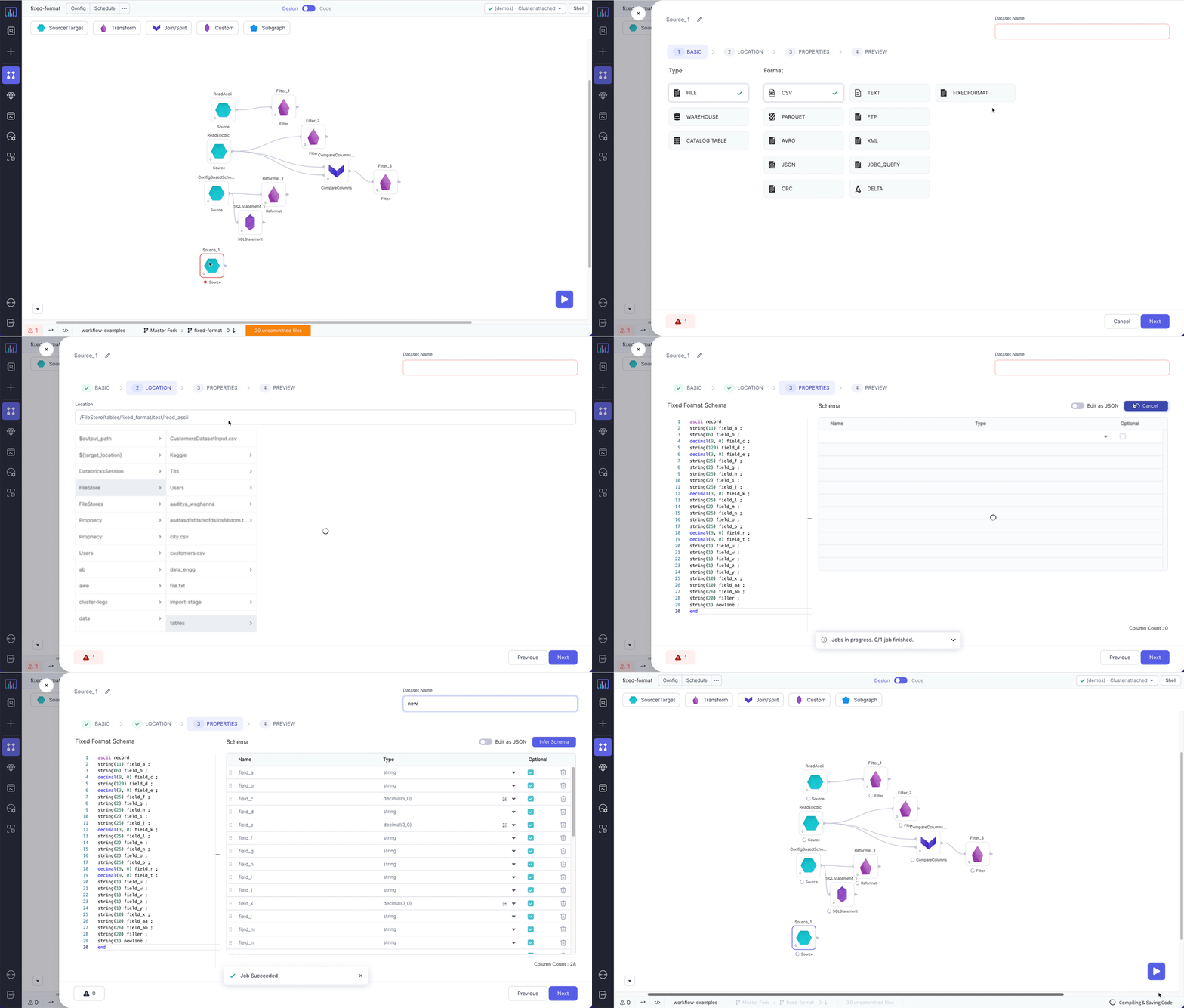 ### Compiled code
To see the compiled code of your project, [switch to the Code
view](/data-engineering/development/pipelines/pipelines#project-editor) in the project header.
```python example.py theme={null}
def read_ebcdic(spark: SparkSession) -> DataFrame:
from prophecy.utils.transpiler import parse
return spark.read\
.option("schema", parse("ebcdic record\nstring(18) c_name;\ndecimal(10, 0) c_custkey ;\nend"))\
.format("io.prophecy.libs.FixedFileFormat")\
.load("/FileStore/tables/fixed_format/test/read_ebcdic")
```
```scala example.scala theme={null}
object ReadEbcdic {
def apply(spark: SparkSession): DataFrame = {
import _root_.io.prophecy.abinitio.dml.DMLSchema.parse
import _root_.io.prophecy.libs.{FFSchemaRecord, _}
import play.api.libs.json.Json
import _root_.io.prophecy.libs.FixedFormatSchemaImplicits._
spark.read
.option(
"schema",
Some("""ebcdic record
string(6) service ;
string(2) person ;
decimal(2, 0) data ;
string(1) format ;
string(1) working ;
end""").map(s => parse(s).asInstanceOf[FFSchemaRecord])
.map(s => Json.stringify(Json.toJson(s)))
.getOrElse("")
)
.format("io.prophecy.libs.FixedFileFormat")
.load("/FileStore/tables/fixed_format/test/write_ebcdic")
.cache()
}
}
```
***
## Target
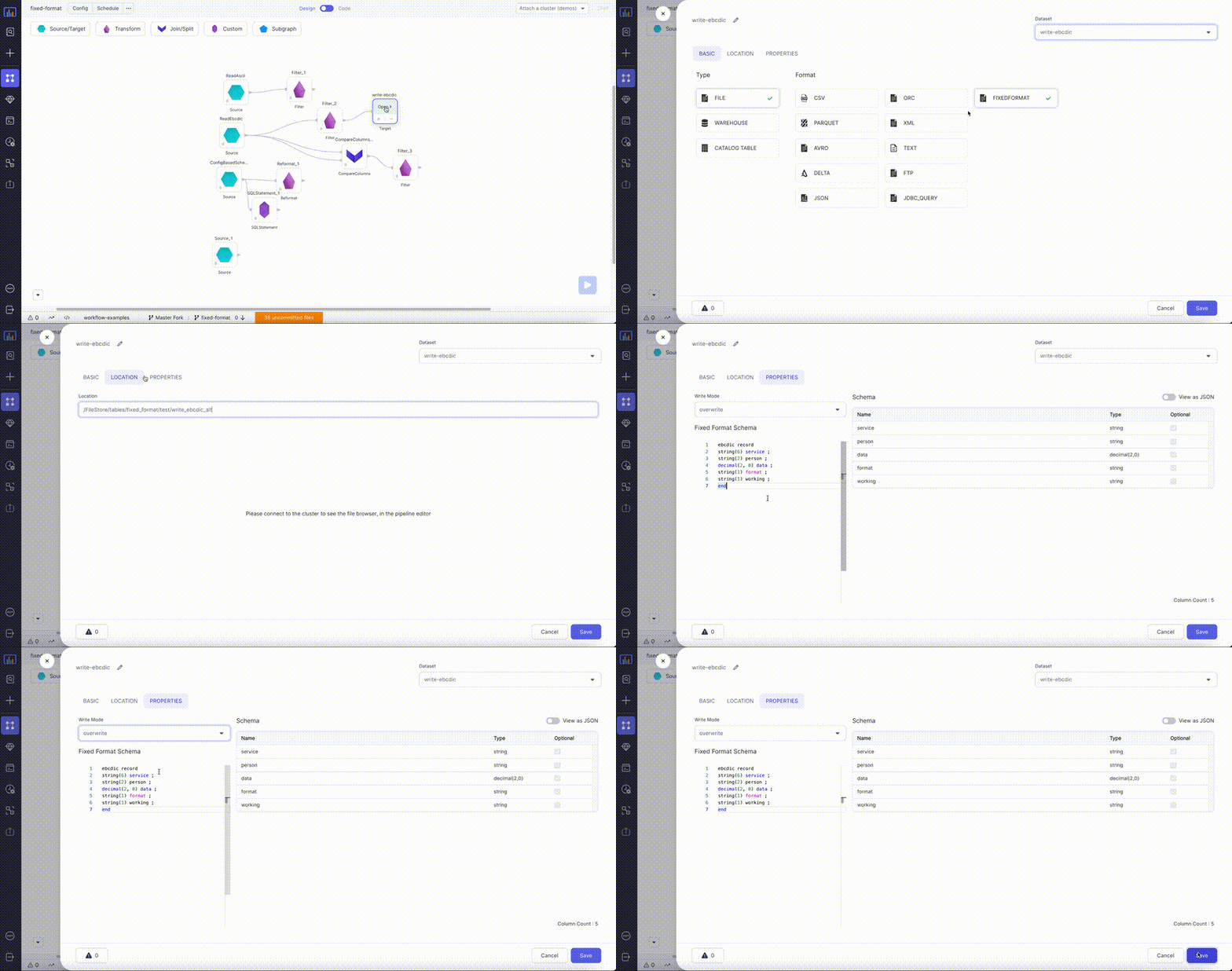
The Target gem writes data to Fixed Format files and allows you to optionally specify the following additional properties.
### Target Properties
| Property name | Description | Default |
| ------------------- | -------------------------------------------------------------------------------------------------------------------- | ------- |
| Write Mode | How to handle existing data. For a list of the possible values, see [Supported write modes](#supported-write-modes). | `error` |
| Description | Description of your dataset. | None |
| Fixed Format Schema | Schema string for the fixed format file. Supports either EBCDIC or ASCII formats. | None |
### Supported write modes
| Write mode | Description |
| ---------- | ----------------------------------------------------------------------------------------------------------------------------------------------- |
| error | If the data already exists, throw an exception. |
| overwrite | If the data already exists, overwrite the data with the contents of the `DataFrame`. |
| append | If the data already exists, append the contents of the `DataFrame`. |
| ignore | If the data already exists, do nothing with the contents of the `DataFrame`. This is similar to the `CREATE TABLE IF NOT EXISTS` clause in SQL. |
### Example
### Compiled code
To see the compiled code of your project, [switch to the Code
view](/data-engineering/development/pipelines/pipelines#project-editor) in the project header.
```python example.py theme={null}
def read_ebcdic(spark: SparkSession) -> DataFrame:
from prophecy.utils.transpiler import parse
return spark.read\
.option("schema", parse("ebcdic record\nstring(18) c_name;\ndecimal(10, 0) c_custkey ;\nend"))\
.format("io.prophecy.libs.FixedFileFormat")\
.load("/FileStore/tables/fixed_format/test/read_ebcdic")
```
```scala example.scala theme={null}
object ReadEbcdic {
def apply(spark: SparkSession): DataFrame = {
import _root_.io.prophecy.abinitio.dml.DMLSchema.parse
import _root_.io.prophecy.libs.{FFSchemaRecord, _}
import play.api.libs.json.Json
import _root_.io.prophecy.libs.FixedFormatSchemaImplicits._
spark.read
.option(
"schema",
Some("""ebcdic record
string(6) service ;
string(2) person ;
decimal(2, 0) data ;
string(1) format ;
string(1) working ;
end""").map(s => parse(s).asInstanceOf[FFSchemaRecord])
.map(s => Json.stringify(Json.toJson(s)))
.getOrElse("")
)
.format("io.prophecy.libs.FixedFileFormat")
.load("/FileStore/tables/fixed_format/test/write_ebcdic")
.cache()
}
}
```
***
## Target
The Target gem writes data to Fixed Format files and allows you to optionally specify the following additional properties.
### Target Properties
| Property name | Description | Default |
| ------------------- | -------------------------------------------------------------------------------------------------------------------- | ------- |
| Write Mode | How to handle existing data. For a list of the possible values, see [Supported write modes](#supported-write-modes). | `error` |
| Description | Description of your dataset. | None |
| Fixed Format Schema | Schema string for the fixed format file. Supports either EBCDIC or ASCII formats. | None |
### Supported write modes
| Write mode | Description |
| ---------- | ----------------------------------------------------------------------------------------------------------------------------------------------- |
| error | If the data already exists, throw an exception. |
| overwrite | If the data already exists, overwrite the data with the contents of the `DataFrame`. |
| append | If the data already exists, append the contents of the `DataFrame`. |
| ignore | If the data already exists, do nothing with the contents of the `DataFrame`. This is similar to the `CREATE TABLE IF NOT EXISTS` clause in SQL. |
### Example
 ### Compiled code
To see the compiled code of your project, [switch to the Code
view](/data-engineering/development/pipelines/pipelines#project-editor) in the project header.
```python example.py theme={null}
def write_ebcdic(spark: SparkSession, in0: DataFrame):
from prophecy.utils.transpiler import parse
in0.write\
.mode("overwrite")\
.option("schema", parse("ebcdic record\nstring(18) c_name ;\ndecimal(10, 0) c_custkey ;\nend"))\
.format("io.prophecy.libs.FixedFileFormat")\
.save("/FileStore/tables/fixed_format/test/write_ebcdic_alt")
```
```scala example.scala theme={null}
object write_ebcdic {
def apply(spark: SparkSession, in: DataFrame): Unit = {
import _root_.io.prophecy.abinitio.dml.DMLSchema.parse
import _root_.io.prophecy.libs.{FFSchemaRecord, _}
import play.api.libs.json.Json
import _root_.io.prophecy.libs.FixedFormatSchemaImplicits._
val schema = Some("""ebcdic record
string(6) service ;
string(2) person ;
decimal(2, 0) data ;
string(1) format ;
string(1) working ;
end""").map(s => parse(s).asInstanceOf[FFSchemaRecord])
var writer = in.write.format("io.prophecy.libs.FixedFileFormat")
writer = writer.mode("overwrite")
schema
.map(s => Json.stringify(Json.toJson(s)))
.foreach(schema => writer = writer.option("schema", schema))
writer.save("/FileStore/tables/fixed_format/test/write_ebcdic_alt")
}
}
```
### Compiled code
To see the compiled code of your project, [switch to the Code
view](/data-engineering/development/pipelines/pipelines#project-editor) in the project header.
```python example.py theme={null}
def write_ebcdic(spark: SparkSession, in0: DataFrame):
from prophecy.utils.transpiler import parse
in0.write\
.mode("overwrite")\
.option("schema", parse("ebcdic record\nstring(18) c_name ;\ndecimal(10, 0) c_custkey ;\nend"))\
.format("io.prophecy.libs.FixedFileFormat")\
.save("/FileStore/tables/fixed_format/test/write_ebcdic_alt")
```
```scala example.scala theme={null}
object write_ebcdic {
def apply(spark: SparkSession, in: DataFrame): Unit = {
import _root_.io.prophecy.abinitio.dml.DMLSchema.parse
import _root_.io.prophecy.libs.{FFSchemaRecord, _}
import play.api.libs.json.Json
import _root_.io.prophecy.libs.FixedFormatSchemaImplicits._
val schema = Some("""ebcdic record
string(6) service ;
string(2) person ;
decimal(2, 0) data ;
string(1) format ;
string(1) working ;
end""").map(s => parse(s).asInstanceOf[FFSchemaRecord])
var writer = in.write.format("io.prophecy.libs.FixedFileFormat")
writer = writer.mode("overwrite")
schema
.map(s => Json.stringify(Json.toJson(s)))
.foreach(schema => writer = writer.option("schema", schema))
writer.save("/FileStore/tables/fixed_format/test/write_ebcdic_alt")
}
}
```