> ## Documentation Index
> Fetch the complete documentation index at: https://docs.prophecy.ai/llms.txt
> Use this file to discover all available pages before exploring further.
# Lookup
> Lookup
Cluster requirements:
* UC dedicated clusters 14.3+ supported
* UC standard clusters 15.4+ supported
* Livy clusters 3.0.1+ supported
Lookup gems allow you to mark a particular DataFrame as a *Broadcast* DataFrame. Spark ensures that this data is available on every computation node so you can perform lookups without shuffling data. This is useful for looking up values in tables.
Lookups are implemented as user-defined functions under the hood in Prophecy. Learn about UDF
support in Databricks on our documentation on cluster [access
modes](/data-engineering/fabrics/spark-provider/databricks/UCShared).
## Parameters
| Parameter | Description |
| ------------- | ------------------------------------------------------------------------- |
| Range Lookup | Whether to perform a lookup with a minimum and maximum value in a column. |
| Key Columns | One or more columns to use as the lookup key in the source `DataFrame`. |
| Value Columns | Columns to reference wherever you use this Lookup gem. |
## Use a Lookup gem
After creating a Lookup gem, you can use the lookup in other gem expressions.
### Column-based lookups
Assume you created this Lookup gem with the following configurations:
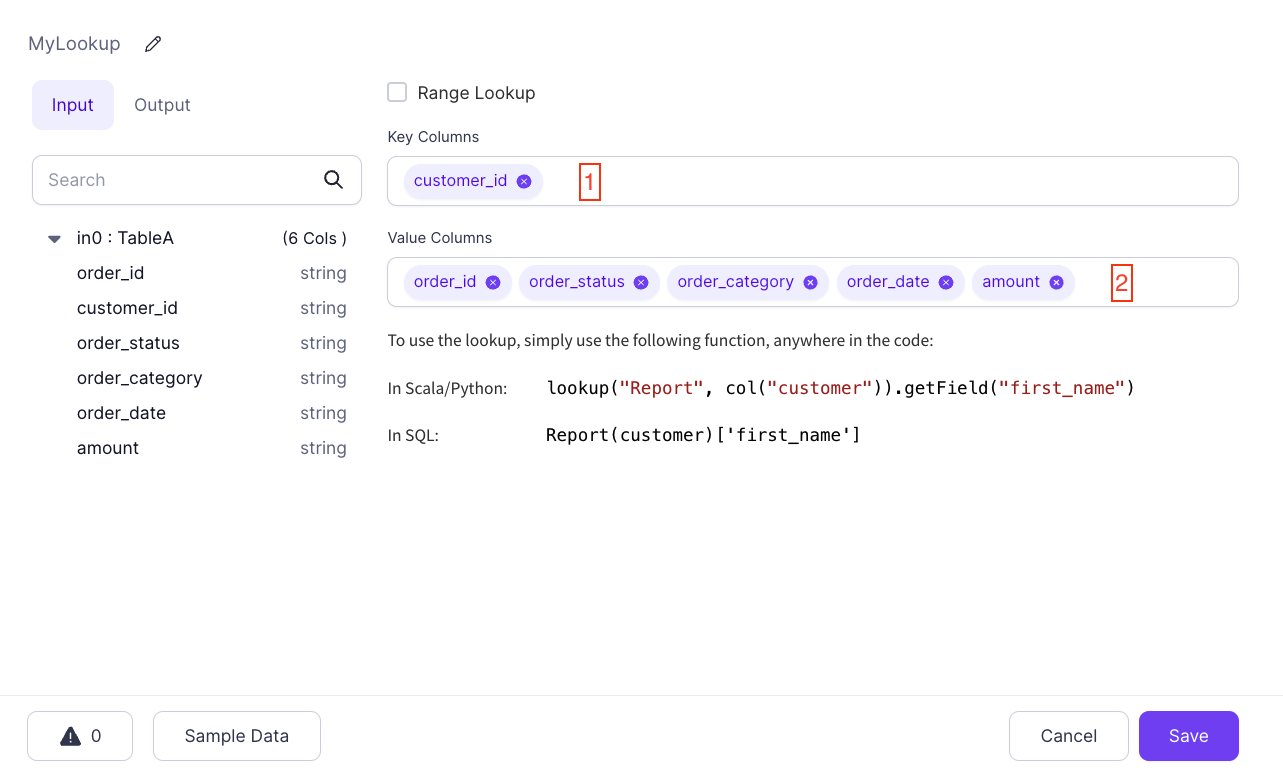 To perform a column-based lookup, use:
```python example.py theme={null}
lookup("MyLookup", col("customer_id")).getField("order_category")
```
```scala example.scala theme={null}
lookup("MyLookup", col("customer_id")).getField("order_category")
```
```sql example.sql theme={null}
MyLookup(customer_id)['order_category']
```
Assume you also have the following [Reformat](/data-engineering/gems/transform/reformat) component:
To perform a column-based lookup, use:
```python example.py theme={null}
lookup("MyLookup", col("customer_id")).getField("order_category")
```
```scala example.scala theme={null}
lookup("MyLookup", col("customer_id")).getField("order_category")
```
```sql example.sql theme={null}
MyLookup(customer_id)['order_category']
```
Assume you also have the following [Reformat](/data-engineering/gems/transform/reformat) component:
 Here, you have a column named `category` that is set to the value of `MyLookup(c_id)['order_category']` in SQL Expression mode. Whatever the value of `order_category` is for the key found in the `c_id` column, which is compared to the source `customer_id` key column, the Lookup gem uses it for a new column.
### Literal lookups
You can use any column reference in a Lookup expression. This means that you can use Lookups with static keys:
```python example.py theme={null}
lookup("MyLookup", lit("0000")).getField("order_category")
```
```scala example.scala theme={null}
lookup("MyLookup", lit("0000")).getField("order_category")
```
```sql example.sql theme={null}
MyLookup('0000')['order_category']
```
This expression evaluates to the value of `order_category` where `customer_id` is `0000`. This is useful in situations where you want to have a table of predefined keys and their values available in expressions.
Here, you have a column named `category` that is set to the value of `MyLookup(c_id)['order_category']` in SQL Expression mode. Whatever the value of `order_category` is for the key found in the `c_id` column, which is compared to the source `customer_id` key column, the Lookup gem uses it for a new column.
### Literal lookups
You can use any column reference in a Lookup expression. This means that you can use Lookups with static keys:
```python example.py theme={null}
lookup("MyLookup", lit("0000")).getField("order_category")
```
```scala example.scala theme={null}
lookup("MyLookup", lit("0000")).getField("order_category")
```
```sql example.sql theme={null}
MyLookup('0000')['order_category']
```
This expression evaluates to the value of `order_category` where `customer_id` is `0000`. This is useful in situations where you want to have a table of predefined keys and their values available in expressions.