> ## Documentation Index
> Fetch the complete documentation index at: https://docs.prophecy.ai/llms.txt
> Use this file to discover all available pages before exploring further.
# BulkColumnRename
> Rename multiple columns in your dataset in a systematic way
Dependencies:
* ProphecySparkBasicsPython 0.2.11+
* ProphecySparkBasicsScala 0.1.9+
* ProphecyLibsPython 1.9.42+
* ProphecyLibsScala 7.1.97+
Cluster requirements:
* UC dedicated clusters 14.3+ supported
* UC standard clusters 14.3+ supported
* Livy clusters 3.0.1+ supported
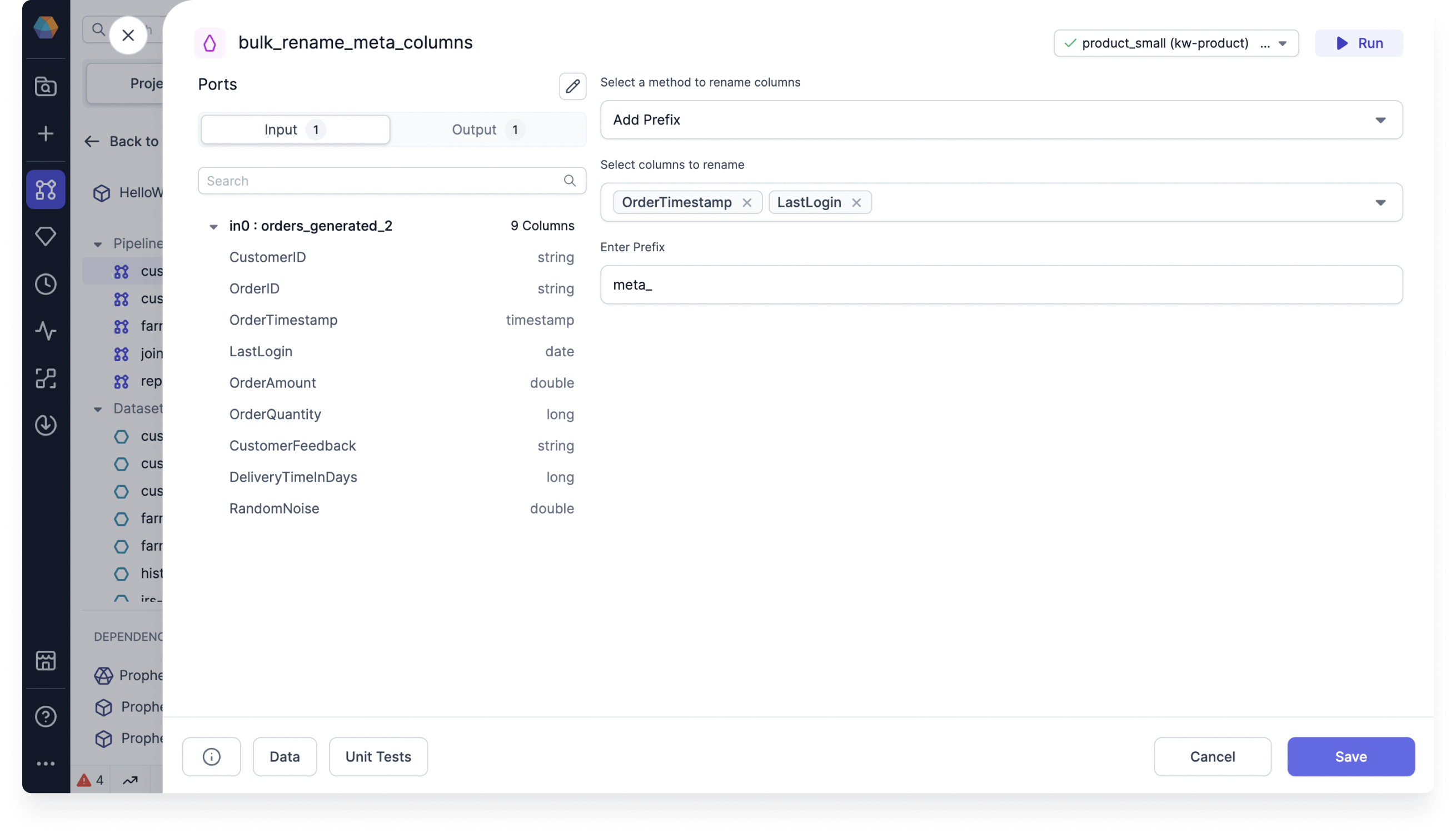
Use the BulkColumnRename gem to rename multiple columns in your dataset in a systematic way.
## Parameters
| Parameter | Description |
| ----------------- | ---------------------------------------------------------------------------------------- |
| Columns to rename | Select one or more columns to rename from the dropdown. |
| Method | Choose to add a prefix, add a suffix, or use a custom expression to change column names. |
Based on the method you select, you will see an option to enter the prefix, suffix, or expression of your choice.
## Examples
### Add a prefix
One example is to add the prefix `meta_` to tag columns that contain metadata.
 ### Use a custom expression
You can accomplish the same or more complex changes using a custom expression like `concat('meta_', column_name)`.
## Example code
To see the compiled code of your project, [switch to the Code
view](/data-engineering/development/pipelines/pipelines#project-editor) in the project header.
```python example.py theme={null}
def bulk_rename_customer_id(spark: SparkSession, in0: DataFrame) -> DataFrame:
from prophecy.utils.transpiler.dataframe_fcns import evaluate_expression
return evaluate_expression(
in0,
userExpression = "concat('int_', column_name)",
selectedColumnNames = ["customer_id"],
sparkSession = spark
)
```
```scala example.scala theme={null}
object bulk_column_rename {
def apply(context: Context, in: DataFrame): DataFrame = {
import org.apache.spark.sql.ProphecyDataFrame
ProphecyDataFrame
.extendedDataFrame(in)
.evaluate_expression("concat('c_',column_name)",
List(" code"),
context.spark
)
}
}
```
### Use a custom expression
You can accomplish the same or more complex changes using a custom expression like `concat('meta_', column_name)`.
## Example code
To see the compiled code of your project, [switch to the Code
view](/data-engineering/development/pipelines/pipelines#project-editor) in the project header.
```python example.py theme={null}
def bulk_rename_customer_id(spark: SparkSession, in0: DataFrame) -> DataFrame:
from prophecy.utils.transpiler.dataframe_fcns import evaluate_expression
return evaluate_expression(
in0,
userExpression = "concat('int_', column_name)",
selectedColumnNames = ["customer_id"],
sparkSession = spark
)
```
```scala example.scala theme={null}
object bulk_column_rename {
def apply(context: Context, in: DataFrame): DataFrame = {
import org.apache.spark.sql.ProphecyDataFrame
ProphecyDataFrame
.extendedDataFrame(in)
.evaluate_expression("concat('c_',column_name)",
List(" code"),
context.spark
)
}
}
```