> ## Documentation Index
> Fetch the complete documentation index at: https://docs.prophecy.ai/llms.txt
> Use this file to discover all available pages before exploring further.
# DataCleansing gem for Data Engineering
> Standardize data formats and address missing or null values in the data
Cluster requirements:
* UC dedicated clusters 14.3+ supported
* UC standard clusters 14.3+ supported
* Livy clusters 3.0.1+ supported
Use the DataCleansing gem to standardize data formats and address missing or null values in the data.
## Parameters
| Parameter | Description |
| -------------------------------- | --------------------------------------------------------------- |
| Select columns you want to clean | The set of columns on which to perform cleaning transformations |
| Remove null data | The method used to remove null data |
| Replace null values in column | The method used to replace null values |
| Clean data | Different ways to standardize the format of data in columns |
## Example
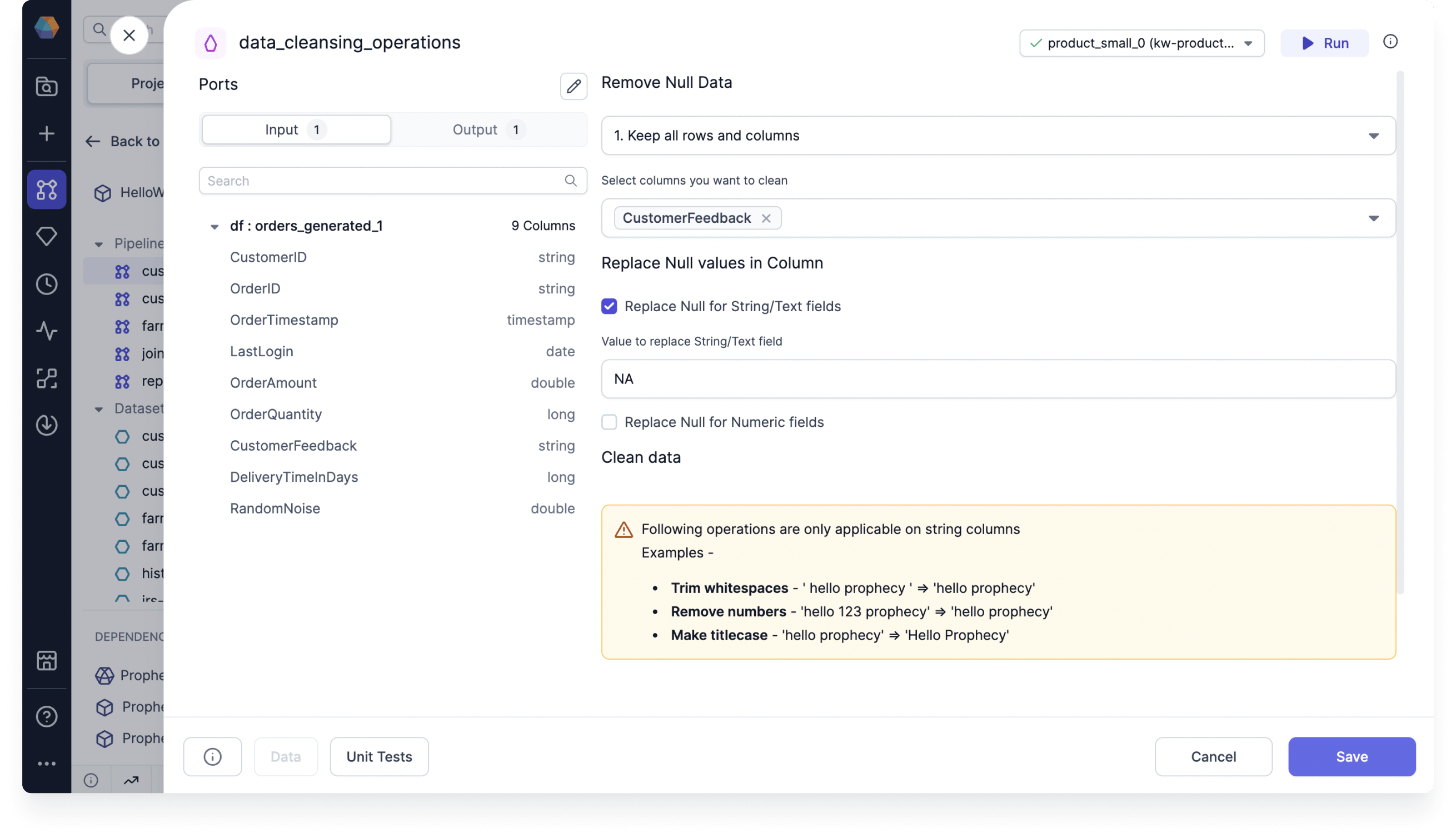
Assume you have a table that includes customer feedback on individual orders. In this scenario, some customers may not provide feedback, resulting in null values in the data. You can use the DataCleansing gem to replace null values with the string `NA`.
 ## Example code
To see the compiled code of your project, [switch to the Code view](/data-engineering/development/pipelines/pipelines#project-editor) in the project header.
```python example.py theme={null}
def data_cleansing_customer_id(spark: SparkSession, df: DataFrame) -> DataFrame:
from pyspark.sql.functions import col, trim, regexp_replace, lower, upper, initcap
from pyspark.sql.types import StringType, IntegerType, FloatType, DoubleType, LongType, ShortType
transformed_columns = []
# Check if column exists after null operations
if "customer_id" not in df.columns:
print("Warning: Column 'customer_id' not found after null operation. Skipping transformations for this column.")
else:
col_type = df.schema["customer_id"].dataType
# If the column is a string type, apply text-based operations
if isinstance(df.schema["customer_id"].dataType, StringType):
df = df.na.fill({"customer_id" : "NA"})
transformed_columns = [lower(col("customer_id")).alias("customer_id")]
elif isinstance(col_type, (IntegerType, FloatType, DoubleType, LongType, ShortType)):
df = df.na.fill({"customer_id" : 0})
transformed_columns = [col("customer_id")]
else:
transformed_columns = [col("customer_id")]
df = df.select(*[col(c) for c in df.columns if c not in ["customer_id"]], *transformed_columns)
return df
```
## Example code
To see the compiled code of your project, [switch to the Code view](/data-engineering/development/pipelines/pipelines#project-editor) in the project header.
```python example.py theme={null}
def data_cleansing_customer_id(spark: SparkSession, df: DataFrame) -> DataFrame:
from pyspark.sql.functions import col, trim, regexp_replace, lower, upper, initcap
from pyspark.sql.types import StringType, IntegerType, FloatType, DoubleType, LongType, ShortType
transformed_columns = []
# Check if column exists after null operations
if "customer_id" not in df.columns:
print("Warning: Column 'customer_id' not found after null operation. Skipping transformations for this column.")
else:
col_type = df.schema["customer_id"].dataType
# If the column is a string type, apply text-based operations
if isinstance(df.schema["customer_id"].dataType, StringType):
df = df.na.fill({"customer_id" : "NA"})
transformed_columns = [lower(col("customer_id")).alias("customer_id")]
elif isinstance(col_type, (IntegerType, FloatType, DoubleType, LongType, ShortType)):
df = df.na.fill({"customer_id" : 0})
transformed_columns = [col("customer_id")]
else:
transformed_columns = [col("customer_id")]
df = df.select(*[col(c) for c in df.columns if c not in ["customer_id"]], *transformed_columns)
return df
```