> ## Documentation Index
> Fetch the complete documentation index at: https://docs.prophecy.ai/llms.txt
> Use this file to discover all available pages before exploring further.
# Analyze tool
> Understand the outcome of your Alteryx transpilation
Prophecy's Analyze tool helps you preview the outcome of your Alteryx-to-Spark or Alteryx-to-SQL migration before you actually run Import. This tool produces a report that lets you identify gaps in tool or function coverage, understand workflow complexity, and anticipate any required fixes.
## Overview
Analyze is available during the [import](/import-tool/alteryx/alteryx-to-spark/alteryx-to-spark#import-pipelines) process.
The Analyze tool can help you understand the outcome of your Alteryx transpilation **before** conducting the actual migration (that is, before clicking **Transpile**).
To use the Analyze tool:
1. Open the **Import tool** from the left sidebar in Prophecy.
2. Select **Alteryx** as source type.
3. Fill in import bundle details, including the language, team, and project where the imported pipeline(s) and other artifacts will reside.
4. Upload your Alteryx workflows.
5. In the **Entities for Transpilation** page, add pipelines to be included in the analysis.
6. *Before* you click **Validate** or **Transpile**, click **Analyze**.
The Analyzer engine produces a report that evaluates each pipeline, checks migration coverage, and scores complexity.
7. Click **Download Analysis Report** and open the resulting Excel file.
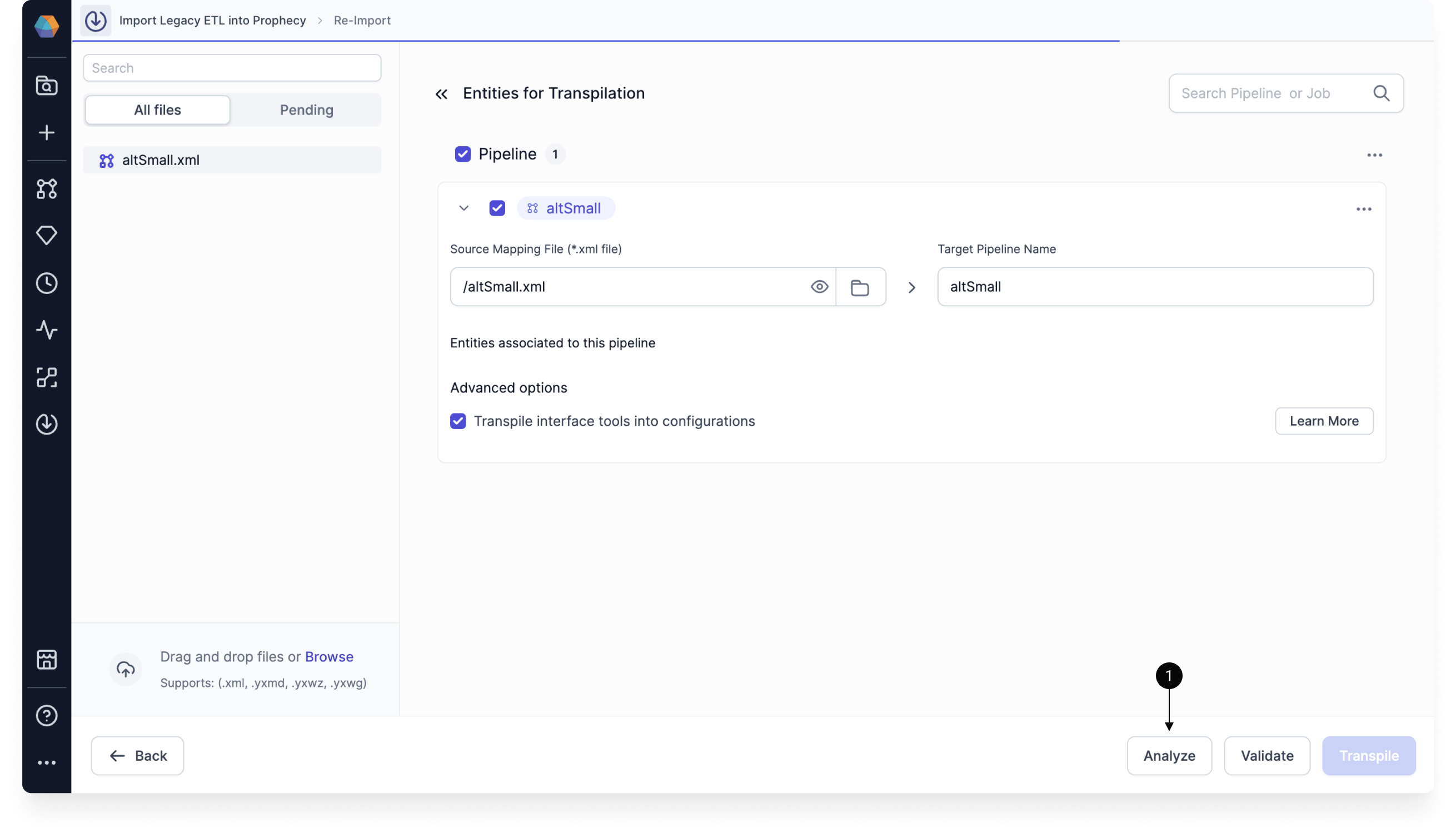 The analysis is based on the tools, functions, and patterns Prophecy can currently migrate “out of the box.” Anything not yet supported is flagged so you can plan ahead.
## Analysis report format
The analysis report contains multiple tabs, each of which highlights a different aspect of migration readiness, helping you understand both *what* will migrate and *how much effort* may be required after Import.
| Tab | Description |
| -------------------- | ------------------------------------------------------------------------------------------------------------------------------------------------------------------------------------------------------------------------------------------------------------------------------------------------------- |
| Summary | Provides a high-level snapshot of overall migration readiness, including Import coverage, supported patterns, and workflow complexity. |
| Coverage | Details which workflows and tools can be processed successfully by Import, along with counts of migrated and unsupported components. |
| Patterns Support | Describes which workflow tools and functions have supported Prophecy mapping patterns. |
| Workflows Complexity | Assigns a low, medium, or high complexity rating to each workflow based on workflow size, tool composition, and diagnostic complexity, with tool type complexity carrying the greatest influence. Workflows with higher complexity typically require more manual review and adjustment after migration. |
| Tool Type Complexity | Rates individual tool types by migration difficulty, reflecting both support coverage and behavioral complexity. |
More detailed explanations for each tab, including calculation logic and definitions, are included directly in the Excel report.
## Summary tab
The Summary tab provides a high-level summary of three other tabs: import coverage for workflows and tools, patterns support for tools and functions, and workflow complexity classifications indicating expected migration effort. For details on these topics, click their respective tabs.
## Coverage tab
For each workflow analyzed, the Coverage tab reports:
* **Migration Status**: whether the workflow can be successfully processed by Import.
* **Tools Migrated Successfully**: number of tool occurrences that can be successfully migrated.
* **Tools Migration Failed**: number of tool occurrences that cannot be migrated (and which will require adjustments after Import).
* **Total Tool Occurrences**: total number of tools in the workflow.
* **Workflows Coverage**: percentage of workflows that can be successfully migrated.
* **Tools Coverage**: percentage of tools successfully migrated.
Coverage reflects availability of mappings, not guaranteed successful migration. As a result, it is possible for Workflows Coverage to be 100% while Tools Coverage is significantly lower.
A tool marked as “migration failed” typically indicates that the tool or its configuration is not currently supported by Import and will require manual conversion after migration.
### Workflows coverage
This section describes the percentage of workflows that Import can process end-to-end. A workflow is considered successfully migrated even if one or more tools within the workflow fail to migrate.
Sample output:
| Details / Workflows | Workflow name |
| --------------------------- | ------------- |
| Migration Status | Success |
| Tools Migrated Successfully | 47 |
| Tools Migration Failed | 283 |
| Total Tool Occurrences | 330 |
| Tools Coverage | 14% |
| Workflows Coverage | 100% |
| Tools Coverage | 14% |
### Tools Coverage
This section lists the number of individual tool occurrences that Import can migrate successfully.
Sample output:
| Tools/Workflows | Number of instances |
| --------------- | ------------------- |
| Filter | 63 |
| Formula | 37 |
| Join | 65 |
| Select | 39 |
| Summarize | 23 |
| Union | 40 |
### Tools breakdown
The Tools breakdown section of the Summary tab lists the number of occurrences of each tool type within each workflow. This helps you:
* Identify workflows dominated by certain tool patterns.
* Understand why tool coverage may be high or low.
* Anticipate where most manual remediation effort will be required.
Sample output:
| Alteryx tool name | Number of instances |
| ----------------- | ------------------- |
| Cleanse | 1 |
| DateTime | 3 |
| DateTimeNow | 1 |
| Db File Input | 19 |
| Filter | 63 |
| Formula | 37 |
Tools that appear frequently and have higher tool type complexity ratings (for example, Summarize or Multi Row Formula) often contribute disproportionately to overall migration effort.
## Patterns Support tab
Patterns Support reports whether the **types of tools and functions** in your workflows have supported mappings in Prophecy. It does **not** reflect whether every individual tool instance can be migrated successfully.
The Patterns Support features two sections:
* **Tools**: evaluates whether each tool type used in the workflow has a supported migration pattern.
* **Functions**: evaluates whether the expressions and functions used within tools can be mapped to Prophecy-supported equivalents.
A tool or function marked as **Supported** indicates that Prophecy has a defined mapping pattern for that tool or function. Individual tool instances may still require manual adjustment depending on configuration, data types, or interaction with other tools.
Function occurrence counts are often higher than tool counts because a single tool (such as Formula or Filter) may reference multiple functions.
Use the Patterns Support tab to:
* Prioritize review of tools that appear frequently in the workflow.
* Confirm whether custom expressions rely on unsupported functions.
* Identify whether migration issues are due to unsupported patterns.
## Workflows Complexity tab
The Workflows Complexity tab assigns each workflow an overall complexity classification of low, medium, or high, based on the following factors:
* **Workflow size complexity**: reflects the number of tools in the workflow.
* **Tool type complexity**: reflects the mix of simple, advanced, and unsupported tools.
* **Diagnostic complexity**: reflects the number of compilation diagnostics produced during analysis.
Each factor is scored separately with a rating of 1 (lower complexity) to 3 (higher complexity). The Analyze tool weighs these factors to produce an **Overall Complexity Score**:
* Low: overall score between 0 and 1
* Medium: overall score between 1 and 2
* High: overall score between 2 and 3
### Tool Type Complexity tab
This tab rates tools according to support coverage and behavioral difficulty. For example, Alteryx tools such as Summarize are rated medium due to multiple configuration paths, while Alteryx tools such as Multi Row Formula are rated hard due to ordering and row-dependency semantics.
Sample output:
| Tool | Complexity |
| --------- | ---------- |
| Filter | Easy |
| Formula | Easy |
| Join | Easy |
| Select | Easy |
| Summarize | Medium |
| Text Box | Easy |
| Union | Easy |
| Unique | Easy |
## Summary of Analyze tool
To summarize, running the Analyze tool before migration helps you:
* **Estimate effort**: Identify complex workflows and unsupported tools ahead of time; complexity scores and diagnostics help predict how much manual adjustment will be needed after Import.
* **Plan fixes**: Know which components will require manual conversion or adjustments.
* **Reduce migration risk**: Catch potential blockers before investing in a full migration.
* **Prioritize work**: Focus on the highest-value or lowest-effort workflows first.
The analysis is based on the tools, functions, and patterns Prophecy can currently migrate “out of the box.” Anything not yet supported is flagged so you can plan ahead.
## Analysis report format
The analysis report contains multiple tabs, each of which highlights a different aspect of migration readiness, helping you understand both *what* will migrate and *how much effort* may be required after Import.
| Tab | Description |
| -------------------- | ------------------------------------------------------------------------------------------------------------------------------------------------------------------------------------------------------------------------------------------------------------------------------------------------------- |
| Summary | Provides a high-level snapshot of overall migration readiness, including Import coverage, supported patterns, and workflow complexity. |
| Coverage | Details which workflows and tools can be processed successfully by Import, along with counts of migrated and unsupported components. |
| Patterns Support | Describes which workflow tools and functions have supported Prophecy mapping patterns. |
| Workflows Complexity | Assigns a low, medium, or high complexity rating to each workflow based on workflow size, tool composition, and diagnostic complexity, with tool type complexity carrying the greatest influence. Workflows with higher complexity typically require more manual review and adjustment after migration. |
| Tool Type Complexity | Rates individual tool types by migration difficulty, reflecting both support coverage and behavioral complexity. |
More detailed explanations for each tab, including calculation logic and definitions, are included directly in the Excel report.
## Summary tab
The Summary tab provides a high-level summary of three other tabs: import coverage for workflows and tools, patterns support for tools and functions, and workflow complexity classifications indicating expected migration effort. For details on these topics, click their respective tabs.
## Coverage tab
For each workflow analyzed, the Coverage tab reports:
* **Migration Status**: whether the workflow can be successfully processed by Import.
* **Tools Migrated Successfully**: number of tool occurrences that can be successfully migrated.
* **Tools Migration Failed**: number of tool occurrences that cannot be migrated (and which will require adjustments after Import).
* **Total Tool Occurrences**: total number of tools in the workflow.
* **Workflows Coverage**: percentage of workflows that can be successfully migrated.
* **Tools Coverage**: percentage of tools successfully migrated.
Coverage reflects availability of mappings, not guaranteed successful migration. As a result, it is possible for Workflows Coverage to be 100% while Tools Coverage is significantly lower.
A tool marked as “migration failed” typically indicates that the tool or its configuration is not currently supported by Import and will require manual conversion after migration.
### Workflows coverage
This section describes the percentage of workflows that Import can process end-to-end. A workflow is considered successfully migrated even if one or more tools within the workflow fail to migrate.
Sample output:
| Details / Workflows | Workflow name |
| --------------------------- | ------------- |
| Migration Status | Success |
| Tools Migrated Successfully | 47 |
| Tools Migration Failed | 283 |
| Total Tool Occurrences | 330 |
| Tools Coverage | 14% |
| Workflows Coverage | 100% |
| Tools Coverage | 14% |
### Tools Coverage
This section lists the number of individual tool occurrences that Import can migrate successfully.
Sample output:
| Tools/Workflows | Number of instances |
| --------------- | ------------------- |
| Filter | 63 |
| Formula | 37 |
| Join | 65 |
| Select | 39 |
| Summarize | 23 |
| Union | 40 |
### Tools breakdown
The Tools breakdown section of the Summary tab lists the number of occurrences of each tool type within each workflow. This helps you:
* Identify workflows dominated by certain tool patterns.
* Understand why tool coverage may be high or low.
* Anticipate where most manual remediation effort will be required.
Sample output:
| Alteryx tool name | Number of instances |
| ----------------- | ------------------- |
| Cleanse | 1 |
| DateTime | 3 |
| DateTimeNow | 1 |
| Db File Input | 19 |
| Filter | 63 |
| Formula | 37 |
Tools that appear frequently and have higher tool type complexity ratings (for example, Summarize or Multi Row Formula) often contribute disproportionately to overall migration effort.
## Patterns Support tab
Patterns Support reports whether the **types of tools and functions** in your workflows have supported mappings in Prophecy. It does **not** reflect whether every individual tool instance can be migrated successfully.
The Patterns Support features two sections:
* **Tools**: evaluates whether each tool type used in the workflow has a supported migration pattern.
* **Functions**: evaluates whether the expressions and functions used within tools can be mapped to Prophecy-supported equivalents.
A tool or function marked as **Supported** indicates that Prophecy has a defined mapping pattern for that tool or function. Individual tool instances may still require manual adjustment depending on configuration, data types, or interaction with other tools.
Function occurrence counts are often higher than tool counts because a single tool (such as Formula or Filter) may reference multiple functions.
Use the Patterns Support tab to:
* Prioritize review of tools that appear frequently in the workflow.
* Confirm whether custom expressions rely on unsupported functions.
* Identify whether migration issues are due to unsupported patterns.
## Workflows Complexity tab
The Workflows Complexity tab assigns each workflow an overall complexity classification of low, medium, or high, based on the following factors:
* **Workflow size complexity**: reflects the number of tools in the workflow.
* **Tool type complexity**: reflects the mix of simple, advanced, and unsupported tools.
* **Diagnostic complexity**: reflects the number of compilation diagnostics produced during analysis.
Each factor is scored separately with a rating of 1 (lower complexity) to 3 (higher complexity). The Analyze tool weighs these factors to produce an **Overall Complexity Score**:
* Low: overall score between 0 and 1
* Medium: overall score between 1 and 2
* High: overall score between 2 and 3
### Tool Type Complexity tab
This tab rates tools according to support coverage and behavioral difficulty. For example, Alteryx tools such as Summarize are rated medium due to multiple configuration paths, while Alteryx tools such as Multi Row Formula are rated hard due to ordering and row-dependency semantics.
Sample output:
| Tool | Complexity |
| --------- | ---------- |
| Filter | Easy |
| Formula | Easy |
| Join | Easy |
| Select | Easy |
| Summarize | Medium |
| Text Box | Easy |
| Union | Easy |
| Unique | Easy |
## Summary of Analyze tool
To summarize, running the Analyze tool before migration helps you:
* **Estimate effort**: Identify complex workflows and unsupported tools ahead of time; complexity scores and diagnostics help predict how much manual adjustment will be needed after Import.
* **Plan fixes**: Know which components will require manual conversion or adjustments.
* **Reduce migration risk**: Catch potential blockers before investing in a full migration.
* **Prioritize work**: Focus on the highest-value or lowest-effort workflows first.