> ## Documentation Index
> Fetch the complete documentation index at: https://docs.prophecy.ai/llms.txt
> Use this file to discover all available pages before exploring further.
# 2026 releases
> Features and enhancements from new releases
## Reformat gem: Live previews and data flow visualization
The [Reformat gem](/data-analysis/gems/prepare/reformat) now provides faster interactive feedback when building transformations.
You can preview data updates automatically as you edit expressions, allowing you to validate changes without repeatedly rerunning the transformation.
You can also use **Visualize Data Flow** to better understand how expressions transform data. Selecting an expression highlights the input columns it references and the output column it produces, making it easier to trace calculations and verify dependencies.
These enhancements help you build, validate, and troubleshoot transformations more efficiently directly within the Reformat gem.
## BigQuery JSON column support
Prophecy now [supports BigQuery's native `JSON` data type](/data-analysis/gems/source-target/table/bigquery#json-columns).
* Infer nested schemas from JSON columns.
* Browse JSON fields as expandable nested structures.
* Reference nested fields in transformations.
* Read from and write to BigQuery JSON columns.
## Improved Agent interactions in chat
The Agent now supports more [interactive workflows directly within chat](/data-analysis/ai/agent/chat/using-chat#interactive-clarification-questions-in-sql-copilot), giving you greater control over how tasks are executed.
When additional information is needed, the Agent can pause and ask clarification questions in the chat. After you select a response, the Agent continues using your answer. This helps the Agent resolve ambiguities and gather missing information instead of making assumptions or failing when more context is required.
The Agent also now requests confirmation before executing pipelines that write data to your warehouse. You can approve a single execution, always allow future executions, or deny the request. This additional safeguard helps prevent unintended data modifications while maintaining a streamlined workflow.
Together, these improvements make Agent interactions more transparent, collaborative, and user-controlled.
## Full dataset profiling in Data Explorer
You can now [calculate data profile statistics across an entire dataset](/data-analysis/development/runs/data-explorer/data-profile), not just the initial sample of 10,000 rows.
After reviewing the sample profile, you can load a full profile to generate column statistics for all rows, providing a more complete view of data quality and value distributions before building or refining pipelines.
## Updated AI chat experience
[Agent chat](/data-analysis/ai/agent/chat/using-chat) has been updated with a cleaner conversation experience. You can now manage chats from chat history, start a new chat, rename chats, delete chats, and copy session details from one place.
The chat input still supports file uploads and `@` mentions for referencing project entities. AI-generated changes now show a review area with the edited entities, and the latest AI response includes an **Undo this** option when changes can be reverted.
## Import Alteryx workflows to Snowflake SQL
You can now migrate Alteryx workflows to Snowflake SQL using a Snowflake fabric. During import, the selected fabric determines the SQL dialect, allowing you to generate pipelines that run natively on Snowflake.
## Connection parameters for projects and pipelines
[Project parameters](/data-analysis/development/parameters/parameters) and pipeline parameters now support **Connection** type variables. Connection parameters allow pipelines to reference fabric connections dynamically instead of selecting a fixed connection directly in a Source or Target gem.
Connection parameters are validated against the current fabric and restricted to compatible connection types. For example, an S3 Source gem only allows S3 connection parameters. Diagnostics are displayed if the referenced connection is missing or has a different type in the active fabric.
## SQL Shell
SQL Pipelines and Analyses/Apps now support a [SQL Shell](/data-analysis/development/studio/sql-shell), an interactive query interface available from the **...** menu in the SQL IDE. The SQL Shell opens as a separate tab alongside pipeline or analysis tabs and lets you run ad-hoc SQL queries directly against the warehouse configured for the current [project fabric](/data-analysis/environment/fabrics/prophecy-fabrics). The shell includes a Monaco SQL editor with syntax highlighting and auto-completion, live query execution output, paginated query results, query history, and Run and Cancel controls.
## New gems in `prophecy_basics` package
Four new gems are now available with the `prophecy_basics` package:
* [WeightedAverage](/data-analysis/gems/transform/weighted-average): Calculate weighted averages for numeric fields, with optional grouping.
* [RunningTotal](/data-analysis/gems/transform/running-total): Compute running totals with configurable partitioning and ordering.
* [Tile](/data-analysis/gems/prepare/tile): Assign records to tiles using methods such as equal sum, equal count, standard deviation bands, or custom cutoffs.
* [Imputation](/data-analysis/gems/prepare/imputation): Replace specified values (such as nulls) in numeric fields with a defined replacement value.
To use these gems, add `prophecy_basics` version 1.0.11 or higher to your project.
## Condition gem
The [Condition](/data-analysis/gems/custom/condition) gem routes rows to one of multiple outputs based on user-defined conditions. Each row is evaluated in order and routed to the first matching output.
You can use this gem to implement branching logic in pipelines, such as splitting datasets, handling exceptions, or applying control flow based on data conditions.
## PostgreSQL source and target support
You can now use [PostgreSQL Source and Target gems](/data-analysis/gems/source-target/external-table/postgres) to read from and write to PostgreSQL databases within your pipelines.
## Concrete types for project parameters
[Project parameters](/data-analysis/development/parameters/parameters) now support concrete types. Values are interpreted based on their content rather than treated as literal strings.
For example, expressions such as `concat("first_name", "last_name")` are recognized as SQL expressions and evaluated accordingly.
## Historical runtime logs
You can now open [historical runtime logs](/data-analysis/development/runs/runtime-logs#access-historical-runtime-logs) directly from the Observability → Run History page. When you click **See Logs**, Prophecy opens the pipeline in [Historical Mode](/data-analysis/development/runs/runtime-logs#historical-mode), which shows the runtime logs, pipeline snapshot, and component execution states associated with that run.
This feature helps you investigate failures, review previous executions, compare historical runs, and rerun pipelines using the original execution snapshot.
## Snowflake fabrics
You can now [create fabrics that use Snowflake as the SQL warehouse for executing pipelines](/data-analysis/environment/fabrics/create-fabrics/snowflake). Snowflake fabrics allow SQL pipelines to run directly in your Snowflake environment.
Snowflake fabrics are available for users who connect Prophecy to their own compute infrastructure. Once a Snowflake fabric is created, projects can run SQL pipelines using Snowflake as the execution engine.
Currently, Snowflake fabrics do not support case sensitivity, creating new partitioned tables, or modifying the partitioning of existing tables.
## Import Alteryx workflows to BigQuery SQL
You can now migrate Alteryx workflows to BigQuery SQL using a BigQuery fabric. During import, the selected fabric determines the SQL dialect, allowing you to generate pipelines that run natively on BigQuery in addition to Databricks.
## Rename and duplicate pipelines
You can now [rename pipelines directly from the Project Explorer](/data-analysis/development/pipelines/data-analysis-pipelines#rename-pipeline) and [duplicate existing pipelines from the Studio canvas](/data-analysis/development/pipelines/data-analysis-pipelines#duplicate-pipeline). Duplicating a pipeline creates a copy of the entire pipeline structure, allowing you to reuse and modify existing workflows more quickly.
## Export compiled SQL
You can now [export the compiled SQL generated from your pipelines](/data-analysis/development/projects/export-code). This allows you to review the SQL produced by Prophecy, run it directly in your warehouse environment, or share it with teams working outside Prophecy.
## New graph-based pipeline format
[Pipeline Python files](/data-analysis/development/pipelines/view-pipeline-py) now use a graph-based structure instead of a task-based format. This improves clarity by showing how steps relate to one another, especially in pipelines with branching or multiple dependencies.
## Databricks job sizes are now configured in fabrics
Databricks job cluster sizes are now configured at the fabric level. This change is part of the new unified fabric model and centralizes cluster configuration for projects that create Databricks jobs.
To create Databricks jobs from the Prophecy UI, you must first define one or more job sizes in the fabric settings.
Projects created before this change may not support Databricks job creation until job sizes are defined in the associated fabric.
This update ensures that cluster configurations are managed centrally and reused consistently across projects.
## Scala JAR support for Spark 3.x and 4.x
Scala pipeline projects [now generate version-specific JARs for Spark 3.x and Spark 4.x runtimes](/data-engineering/extensibility/dependencies/spark-dependencies#scala-jar-selection-for-spark-3-x-and-spark-4-x). Prophecy automatically selects the appropriate JAR based on the target cluster runtime.
This change ensures compatibility across environments using different Scala versions (2.12 for Spark 3.x and 2.13 for Spark 4.x), eliminating runtime errors caused by binary incompatibility.
To support this, pipeline builds now use Maven profiles to produce JARs for each supported Scala version from a single codebase.
## Huge improvements to the Agent
Private Preview
[Prophecy Agents](/data-analysis/ai/agent/agent) have been completely redesigned to be more powerful, accurate, and delightful to work with. Try using the upgraded Agent to transform, document, and harmonize your data.
The Agent will now describe how it's thinking as it works through your request, making the process transparent and easier to debug. This additional thinking also helps the Agent make better decisions and produce more accurate results. Because of this, you can prompt the Agent with more complex requests and decrease the time to results during development.
## Analysis dashboards
You can now quickly gain insight about your data by asking the Agent to create data analyses for you. These analyses are available and customizable using dashboards, which you can share with your team or deploy on a schedule. See the [analysis overview](/data-analysis/analysis/overview) for more information.
Analysis dashboards were built on Prophecy Apps, which are now deprecated.
## Visual container enhancements
[Visual containers](/data-analysis/development/studio/containers) let you organize related gems in your pipeline for easier navigation and understanding. We now support nesting containers within other containers.
## Spark version support
Prophecy now supports Spark 4.0. Previously, only Spark 3.5 and earlier were supported.
## Prophecy Library versions
* ProphecyLibsPython 2.1.10
* ProphecyLibsScala 9.0.0
## Parameter sets
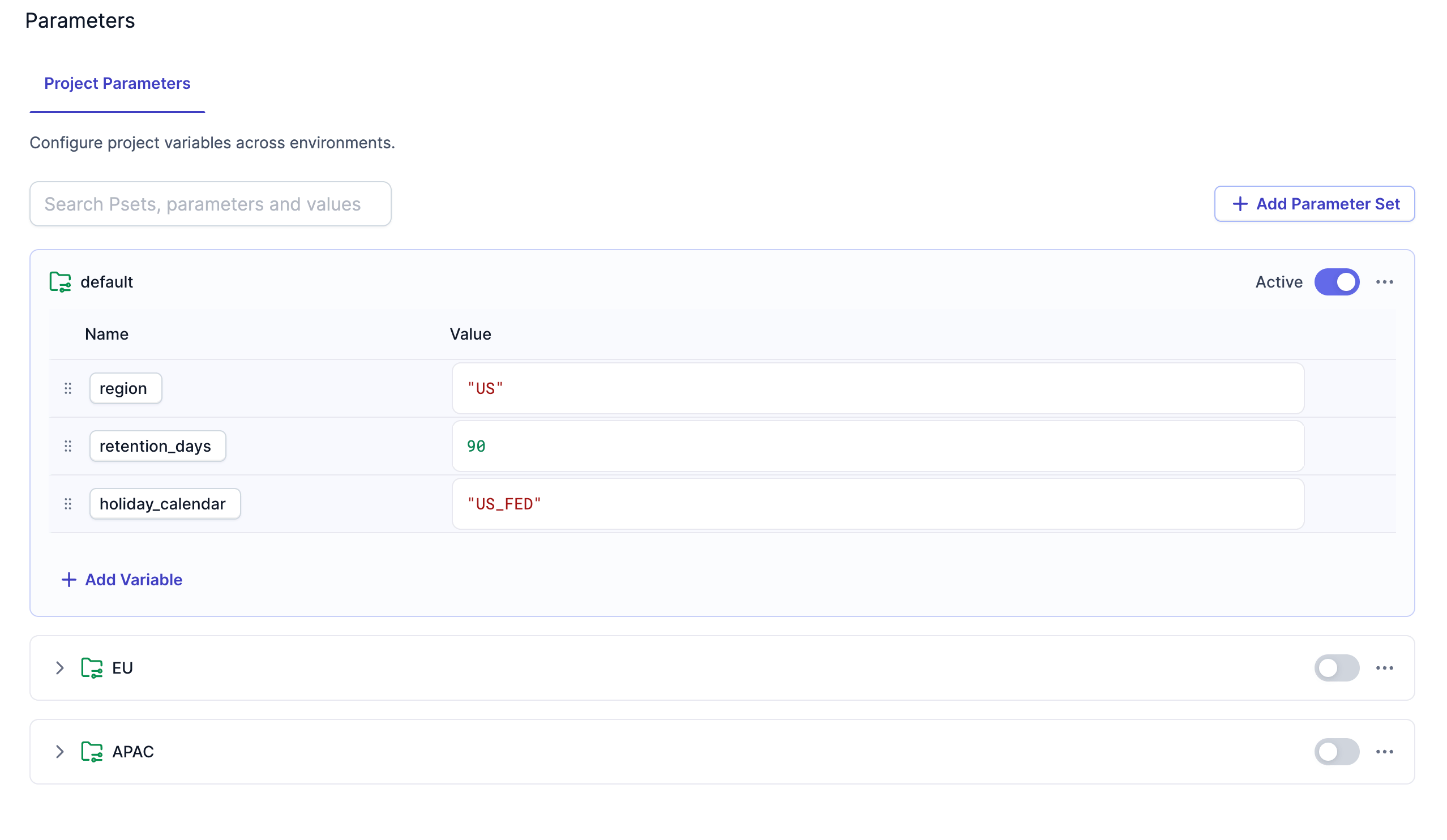
You can now create [parameter sets](/data-analysis/development/parameters/parameter-sets) to assign values to variables for different environments or deployment scenarios. Parameters can be global (project-level) or local (pipeline-level). You'll be able to select the appropriate parameter set during project deployment or app runs.
 ## Source and target file enhancements
We've made several enhancements to the source and target gems for file storage systems:
* **Compression**: Source gems can now read compressed files and target gems can now write compressed files in the following formats: `gzip`, `zstd`, `lz4`, `zlib`, `snappy`, and `lzop`.
* **Examine**: Gems now have an **Examine** button in the **Location** tab. When you click the Examine button, Prophecy reads a small sample of the file to automatically determine the file format, compression type (if any), and schema.
* **Encryption**: Target gems can now write encrypted files using the following encryption methods: `AES-192`, `AES-296`, and `BlowFish`. Source gems cannot read encrypted files.
## PySpark for data analysis projects
Private Preview
Prophecy now offers [Simplified PySpark](/data-analysis/development/projects/project-languages#simplified-pyspark) for data analysis. This project type abstracts PySpark into a simple, data analysis interface. You can switch between SQL and PySpark project types in the [development settings](/data-analysis/development/studio/development-settings) of a project.
We've also added support for [unit tests](/data-analysis/development/tests/unit-tests) for PySpark projects. In future releases, we will support unit tests for SQL projects as well.
## SAP HANA target gem
The [SAP HANA target gem](/data-analysis/gems/source-target/external-table/hana/hana) now supports **Delete and Insert** and **SCD2** write modes.
## ProphecySparkBasicsPython v0.2.54
This new version of the ProphecySparkBasicsPython package includes the following enhancements:
* Added support for bulk updating target columns during [SCD1 Delta merge](/data-engineering/gems/source-target/file/delta#scd1). This way, you don't have to write individual update expressions for each column.
* Added support for lateral column aliases in [Reformat](/data-engineering/gems/transform/reformat) and [Join](/data-engineering/gems/join-split/join) gems. Lateral column aliasing in PySpark allows you to reuse a column alias defined earlier in the same clause.
## Prophecy Library versions
* ProphecyLibsPython 2.1.9
* ProphecyLibsScala 8.16.0
## Fabric creation improvements
When you create a fabric, you no longer need to select the "type" of fabric to create. Instead, Prophecy has a unified fabric that lets you configure settings based on the compute provider, rather than the fabric type. For example, you can now use a Databricks fabric to run both SQL and PySpark pipelines.
## Feature management
We've added a new [Feature Management](/data-engineering/administration/management/cluster-admin-settings/feature-management) tab to the Admin settings. This tab allows you to enable or disable various features in your Prophecy deployment through the Prophecy UI.
## Source and target file enhancements
We've made several enhancements to the source and target gems for file storage systems:
* **Compression**: Source gems can now read compressed files and target gems can now write compressed files in the following formats: `gzip`, `zstd`, `lz4`, `zlib`, `snappy`, and `lzop`.
* **Examine**: Gems now have an **Examine** button in the **Location** tab. When you click the Examine button, Prophecy reads a small sample of the file to automatically determine the file format, compression type (if any), and schema.
* **Encryption**: Target gems can now write encrypted files using the following encryption methods: `AES-192`, `AES-296`, and `BlowFish`. Source gems cannot read encrypted files.
## PySpark for data analysis projects
Private Preview
Prophecy now offers [Simplified PySpark](/data-analysis/development/projects/project-languages#simplified-pyspark) for data analysis. This project type abstracts PySpark into a simple, data analysis interface. You can switch between SQL and PySpark project types in the [development settings](/data-analysis/development/studio/development-settings) of a project.
We've also added support for [unit tests](/data-analysis/development/tests/unit-tests) for PySpark projects. In future releases, we will support unit tests for SQL projects as well.
## SAP HANA target gem
The [SAP HANA target gem](/data-analysis/gems/source-target/external-table/hana/hana) now supports **Delete and Insert** and **SCD2** write modes.
## ProphecySparkBasicsPython v0.2.54
This new version of the ProphecySparkBasicsPython package includes the following enhancements:
* Added support for bulk updating target columns during [SCD1 Delta merge](/data-engineering/gems/source-target/file/delta#scd1). This way, you don't have to write individual update expressions for each column.
* Added support for lateral column aliases in [Reformat](/data-engineering/gems/transform/reformat) and [Join](/data-engineering/gems/join-split/join) gems. Lateral column aliasing in PySpark allows you to reuse a column alias defined earlier in the same clause.
## Prophecy Library versions
* ProphecyLibsPython 2.1.9
* ProphecyLibsScala 8.16.0
## Fabric creation improvements
When you create a fabric, you no longer need to select the "type" of fabric to create. Instead, Prophecy has a unified fabric that lets you configure settings based on the compute provider, rather than the fabric type. For example, you can now use a Databricks fabric to run both SQL and PySpark pipelines.
## Feature management
We've added a new [Feature Management](/data-engineering/administration/management/cluster-admin-settings/feature-management) tab to the Admin settings. This tab allows you to enable or disable various features in your Prophecy deployment through the Prophecy UI.