
This gem runs in .
Overview
Use the SpatialMatch gem to find relationships between geometries from two different datasets. Common use cases include:- Finding which stores are located within specific delivery zones
- Identifying roads that intersect with flood zones
- Matching customer locations to their nearest service areas
Prerequisites
- Add
ProphecyDatabricksSqlSpatialversion 0.0.3 or higher to your project.
Input and Output
The SpatialMatch gem accepts the following inputs and output.| Port | Description |
|---|---|
| in0 | Dataset containing geometries (points, lines, or polygons) in WKT format. This is the “left” dataset in the spatial join operation. |
| in1 | Dataset containing geometries (points, lines, or polygons) in WKT format. This is the “right” dataset in the spatial join operation. |
| out | Output dataset containing matched pairs of geometries along with all additional columns from both input datasets. Each row represents a source geometry and target geometry that satisfy the selected spatial relationship. Unmatched geometries are excluded from the output. The output includes the following columns:
|
Use the following gems to create correctly formatted geometries in a dataset:
- CreatePoint gem for points
- PolyBuild gem for lines and polygons
Parameters
Configure the SpatialMatch gem using the following parameters.| Parameter | Description |
|---|---|
| Source Column | Select the column from in0 that contains one set of geometric data. |
| Target Column | Select the column from in1 that contains another set of geometric data. |
| Select Match Type | Choose the spatial relationship that determines when a source geometry matches a target geometry. Learn more in Match types. |
Match types
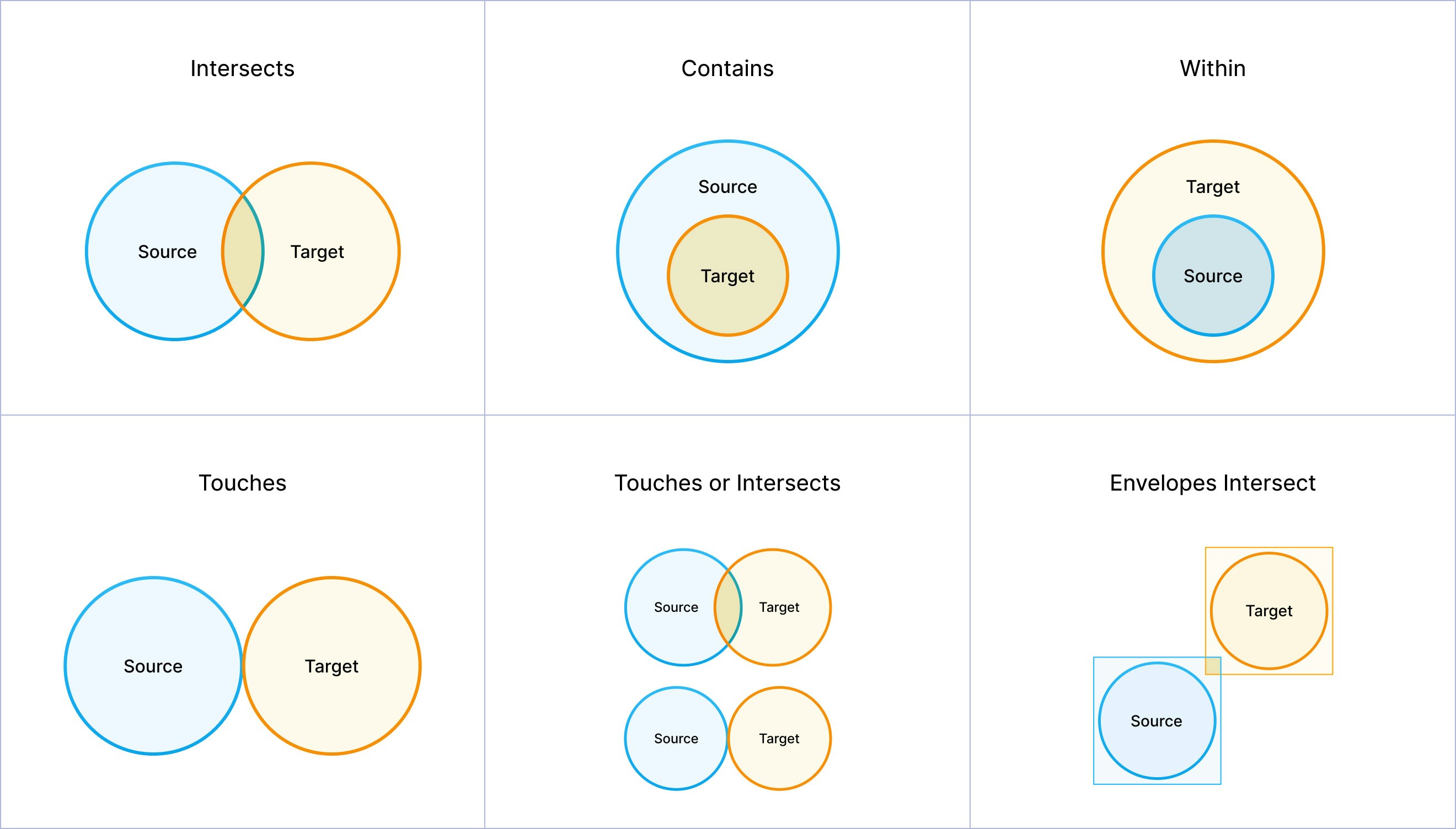
Review the following to understand the criteria to satisfy different match types. The SpatialMatch gem returns a row for each match condition that is met.| Match type | Description |
|---|---|
| Source Intersects Target | Condition is met if the source and target geometries share any portion of space. This is the most general spatial relationship. Any overlap, touching, or containment satisfies intersection. |
| Source Contains Target | Condition is met if the source geometry completely contains the target geometry. The target geometry must be entirely within the source geometry’s interior and boundary. |
| Source Within Target | Condition is met if the source geometry is completely contained within the target geometry. This is the inverse of the Contains relationship. |
| Source Touches Target | Condition is met if the source and target geometries have at least one point in common, but their interiors do not intersect. |
| Source Touches or Intersects Target | Condition is met if the source and target geometries either touch (share boundary points) or intersect (share any portion of space). This combines the touch and intersect relationships. |
| Source Envelope Overlaps Target Envelope | Condition is met if the minimum bounding rectangles (envelopes) of the source and target geometries overlap. This is a less precise check than a standard intersection. |
Match types diagram
The following diagram includes visualizations for each match type.
Example: Find stores within delivery zones
Assume you have two datasets:-
store_locationscontains store locations as points.store_id store_name store_location store_type 1 Downtown Electronics POINT(-74.0059 40.7128) electronics 2 Midtown Cafe POINT(-73.9857 40.7489) restaurant 3 Brooklyn Bookstore POINT(-73.9442 40.6782) bookstore 4 Queens Pharmacy POINT(-73.7949 40.7282) pharmacy 5 Upper East Side Boutique POINT(-73.9626 40.7831) clothing -
delivery_zonescontains delivery zones as polygons.zone_id zone_name zone_polygon delivery_fee MANHATTAN_SOUTH Lower Manhattan POLYGON((-74.0200 40.7000, -74.0200 40.7300, -73.9800 40.7300, -73.9800 40.7000, -74.0200 40.7000)) 5.99 MANHATTAN_NORTH Upper Manhattan POLYGON((-73.9800 40.7700, -73.9800 40.8000, -73.9400 40.8000, -73.9400 40.7700, -73.9800 40.7700)) 7.99 BROOKLYN_WEST Western Brooklyn POLYGON((-74.0000 40.6500, -74.0000 40.7000, -73.9200 40.7000, -73.9200 40.6500, -74.0000 40.6500)) 6.99 QUEENS_CENTRAL Central Queens POLYGON((-73.8500 40.7000, -73.8500 40.7500, -73.7500 40.7500, -73.7500 40.7000, -73.8500 40.7000)) 8.99
- Add a SpatialMatch gem to your pipeline canvas.
- Attach
store_locationsto the in0 port of the gem. - Attach
delivery_zonesto the in1 port of the gem. - Open the gem configuration interface.
- For the Source field, select the
store_locationcolumn from thestore_locationstable. - For the Target field, select the
zone_polygoncolumn from thedelivery_zonestable. - Under Select Match Type, select Source Within Target.
- Save and run the gem.
Result
The SpatialMatch gem will return only the pairs of geometries that satisfy the selected match type. As a result:- Downtown Electronics matches the
MANHATTAN_SOUTHzone. - Queens Pharmacy matches the
QUEENS_CENTRALzone. - Upper East Side Boutique matches the
MANHATTAN_NORTHzone. - Midtown Cafe does not match any zone. This means that it is not in any delivery zone.

