

Edit analysis code
You can now edit an analysis directly as code. Each analysis is stored as a Python file in the project atapps/<analysis_name>.py. Open the file in the Code view, and when you save, Prophecy compiles it and updates the analysis in the visual editor.If the file doesn’t compile, Prophecy keeps your code, reports the error on the file, and marks the analysis as stale until you fix it. See Edit the analysis code.Handle target rows not in source for Upsert and Append Unique
On Databricks, the Upsert Row and Append Unique Rows write modes now let you choose what happens to target rows that have no match in the incoming dataset: Do nothing (default), Delete rows, or Update columns. Add a Run only when condition to apply the action to only some unmatched rows.Limit gem: Offset
The Limit gem now has an optional Offset parameter that skips a number of rows before returning rows. Limit and Offset both accept whole numbers, configuration variables, and arithmetic on them, such as{{ page_size }} * 2.Alteryx import: analyses and more Source gem types
When you import Alteryx workflows, Prophecy now creates an analysis for each workflow that contains Interactive Chart or Table (Reporting) tools. Each chart or table becomes a widget, and tables keep their configured column selection, order, and labels.Input tools that read tables now convert to Source gems that match the tool’s connection: Databricks, Amazon Redshift, Postgres, or SAP HANA, with Oracle used when the Transpiler doesn’t recognize the database.Choose the OAuth app registration for Databricks fabrics
Databricks fabrics, including fabrics that use a compute cluster for Spark, no longer always use the provider’s default app registration. If you have more than one Databricks or ID Anywhere app registration, select the one the fabric uses when you configure OAuth. The fabric uses that registration for sign-in, interactive runs, scheduled runs, and test connections. See App registration selection.The Databricks Serverless personal access token requirement has been removed.Restart services after adding Kerberos keytabs
Keytab changes for Livy fabrics take effect after Prophecy restarts its services. Admins can now click Restart services in Settings > Admin > Security and either restart immediately or schedule the restart in 15 minutes, with a maintenance banner shown to all users until then.SAML single logout
SAML authentication now supports single logout (SLO). When enabled, signing out of Prophecy also signs the user out of your IdP, and signing out of your IdP ends the user’s Prophecy session. You can optionally sign SLO messages with a certificate that Prophecy generates.Automatic SSO sign-in
When your deployment uses a single SSO provider, returning SSO users skip the Prophecy sign-in page and go directly to the identity provider. To reach the Prophecy sign-in page, add?autoLogin=false to your Prophecy URL. See Automatic SSO sign-in.OAuth token lifetime guidance
For OAuth app registrations, set Token Lifetime longer than the login grace period (720 minutes by default). A shorter lifetime requires users to sign in again on every connection.DataBox
Available for the Professional Edition, DataBox is a file storage system that Prophecy manages for your team. Upload files once, then use them across projects, add them to pipelines as sources, and give the Agent access to them. Each fabric has one DataBox, shared by everyone who uses that fabric.When you upload files into Agent chat or onto the canvas, these files are stored in DataBox in the project’s folder. The Agent can also browse, read, upload, organize, and delete DataBox files; the Agent asks for confirmation before deleting anything.Open DataBox from the left navigation bar, or from the DataBox icon on the pipeline canvas. From DataBox you can:- Organize files in your personal folder, project folders, and team members’ folders.
- Upload files up to 2 GB each, create folders, and rename files.
- Search files, tables, and schemas across DataBox and your connections.
- Preview files, and add them to a pipeline with Add as Source or by dragging them onto the canvas.
- Restore deleted files from Trash for up to 30 days.
- Browse your connections and add new ones with Add Connection.
Connections in Professional Edition
Professional Edition now supports connections and secrets. Add a connection from DataBox to work with data from platforms such as Databricks, Snowflake, and BigQuery.Snowflake password authentication is deprecated
Snowflake is deprecating password-based sign-in for service users, enforced starting October 2026. Snowflake fabrics and connections that authenticate with a username and password stop working once Snowflake enforces the cutover. Use key-pair or OAuth authentication instead.- New Snowflake fabrics offer only Key-pair and OAuth authentication. Username and Password appears only on existing fabrics that already use it.
- Existing Snowflake fabrics that use password authentication show a banner and a Migrate action. Click Migrate to move the fabric to key-pair or OAuth authentication. See Migrate from password authentication.
- Snowflake connections that use password authentication are flagged with a Password auth badge on the Connections tab. Edit these connections to use key-pair or OAuth authentication. See Snowflake connections.
- Snowflake SQL fabrics for Data Engineering support only username and password, and can’t be switched to another method. These fabrics are also flagged with a Password auth badge. To use key-pair or OAuth, move to a unified Snowflake fabric. Contact your Prophecy admin about migrating before Snowflake enforces the cutover.
Large SQL projects load and compile faster
Large SQL projects now open and compile faster. Prophecy reuses cached results for unchanged pipelines instead of recompiling them each time. In testing with a 13,000-node project, load time decreased from 46 seconds to 25 seconds.Additional performance improvements reduce the amount of gem specification data sent to the browser, speed up SQL parsing during validation and compilation, and use the faster dbt Fusion engine to for dbt-backed projects.Undo and redo
Undo and redo behavior is now consistent across the product.Informatica-to-BigQuery conversion fidelity
Informatica-to-BigQuery conversions now more closely preserve Informatica behavior across joins, lookups, aggregations, routers, sequence generators, date and string functions, file and target handling, connections, and parameters.The improvements focus on runtime fidelity, including NULL handling, safer date parsing and casts, deterministic sequence generation, and preservation of file formats and physical table names.To pick up these improvements, re-import existing Informatica estates.Add a gem from a connection
You can now insert a gem directly into an existing connection instead of dragging one onto the canvas separately. Hover over a connector, or over a gem’s input or output port, to reveal a+ button that opens the gem palette at that point in the flow.- Hovering over an input port inserts the new gem before it, splicing into any existing connection automatically.
- Hovering over an output port with no downstream connections attaches the new gem directly. If the port already feeds one or more gems, you can choose to insert the new gem into the flow (
A → New Gem → B) or add it as a separate path that reads the same output.
Visual containers: new actions and background color
Visual containers have a refreshed action menu. Grouping gems now happens via Actions > Group at the bottom of the canvas, and each container’s … menu adds Add to AI, Explain, and Edit Background Color, alongside the existing Ungroup, Attach Annotation, and Collapse/Expand options.Canvas annotations
You can add free-form text annotations directly on the pipeline. See Canvas annotations.Alt-key row counts and wireless connection reveal
Holding Alt (Option on Mac) on the canvas now switches interim row-count labels to their exact value instead of a rounded, compact format (for example,100K rows becomes 100,000 rows). Holding Alt also reveals all wireless connections on the canvas at onceß.Mark pipelines as draft
You can now mark an individual pipeline asdraft to keep working on it while excluding its in-progress changes from the project’s next published version. If the pipeline has been published before, it ships unchanged in the new version; if it hasn’t, it’s left out entirely. The changes list during publication shows held-back pipelines and apps with a Draft - Held label and a summary count.See Mark pipeline as draft and Draft pipelines.Lock Pipeline gem triggers and schedules to a specific version
The Pipeline gem now has a Version parameter for choosing which published version of the target pipeline to trigger: Current (default, always up to date), Last Released (resolves to the newest published version at run time), or a specific version number, which keeps triggering that exact release even as the target pipeline is edited, drafted, or republished.Similarly, schedules can now be locked to a specific published version instead of always following the latest publish. Locks apply per fabric, so the same schedule can be locked on one fabric’s deployment while following the latest published version on another.Improved Excel file uploads
Uploading Excel files (XLS, XLSX) via Upload files in Agent chat or the Upload Files gem now exposes Excel-specific read options.You can also mark multiple regions of a workbook as separate tables. In the Upload Files gem, each marked table becomes its own output port, with independent schema editing, drift-handling, and the ability to unmark or delete it.Join gem: Simple and Advanced modes
The Join gem now offers a guided Simple mode alongside the existing Advanced mode. Simple mode walks you through choosing a join type, defining match conditions, and selecting output columns for two-input joins; a Where rows go panel shows which output port each row lands on for the selected join type.The Join gem also now features Semi Join and Anti Join types.Pivot gem: warehouse-specific configuration and unique value fetching
The Pivot gem also now has a Simple mode. Instead of manually typing pivot column values, click Fetch unique values to retrieve and select the distinct values from your pivot column directly. Column aliasing for aggregations is available on Databricks and BigQuery, but not on Snowflake.Execution plane events in audit logs
Audit logs now capture actions performed directly on the execution plane (the orchestrator service running in your environment) — such as fabric, connection, secret, deployment, pipeline run, and schedule operations — in addition to control plane GraphQL calls and UI interactions. These events are recorded locally on the execution plane first, then forwarded to the control plane in batches (every 30 minutes by default), so there’s a short delay before they appear in the central audit log.Execution plane events are identified by a fixed event type and category (for example,pipeline_run_scheduled / compute, connection_create / data_flow, login_federated / auth) rather than a GraphQL query name.Table gem: Schema mapping for existing target tables
The Table gem now lets you reconcile schema differences when writing to an existing target table.You can use Map Schema to assign each target column its corresponding source column. Prophecy suggests mappings automatically for unmapped columns, which you can review and adjust, and applies any required casts or transformations so incoming data conforms to the target schema.You can also use Overwrite Target Schema if you’d rather the target adopt the incoming schema instead; this replaces the existing target schema with the source schema.These enhancements are available for Table targets across Databricks, BigQuery, and Snowflake, making it easier to write into existing tables without manually reconciling schema drift.Parameterize table and view locations
Table gem Location tabs now support setting database, schema, and table/view name from project or pipeline parameters, not just fixed values. Each Location field can be set to Value (a fixed name, as before) or Configuration Parameter (bound to ansql_expression parameter), so the same table or view definition can resolve to different locations depending on which parameter set is active.New additions to the Location tab:- Table alias — a stable, logical identifier for the table or view that persists even if the underlying database, schema, or name changes. Set once at creation; cannot be changed afterward.
- Parameter set selector — shows the active pipeline’s parameter set automatically, or lets you choose one when working outside a pipeline context.
- Live location preview — shows the resolved
database.schema.tablevalue as you configure the gem.
Improved data harmonization workflow
Harmonize source data with standardized data models using a guided mapping experience. Upload Excel, CSV, or Parquet files, or select existing tables, then let the Agent automatically map source fields to a target data model. Review mappings, resolve data quality issues with AI-generated suggestions, preview the transformed output, and export the harmonized dataset. Prophecy also automatically generates the underlying pipeline, allowing you to inspect and customize the resulting workflow.Structured Finance edition
Prophecy now offers Structured Finance, a specialized application for onboarding, standardizing, and analyzing loan-level data. Access it athttps://app.prophecy.ai/finance/ (requires a separate sign-in from Professional Edition).Four workflows are included:- Tape Cracking – Maps a source loan tape to a standardized asset-class data model using the Harmonization Agent, which generates mappings, validates data quality, and proposes fixes.
- Stratifications & Pool Selection – Generates standard stratification analyses (principal balance, contract rate, obligor state, credit score, LTV) from a harmonized loan tape and supports sub-pool selection. Currently available for US Auto ABS; US RMBS, European RMBS, and European Auto ABS are coming soon.
- Peer Comparison – Benchmarks a deal against the prior shelf and recent issuer comparables.
- Post-Close Surveillance – Monitors closed deals via watchlists, vintage performance, and investor reporting.
Improved RestAPI gem
The RestAPI gem now uses a guided multi-step configuration flow that separates request definition, authentication, response handling, and resilience settings. New capabilities include configurable response parsing for JSON and XML, optional response flattening, asynchronous polling for long-running API requests, flexible authentication options (including API keys and M2M OAuth bearer tokens), and configurable retry behavior for transient failures.Improved Aggregation gem
The Aggregate gem now features an easier-to-use Simple mode for the Aggregate gem with guided Grouping, Aggregations, and Aggregate Filters sections, while preserving the existing Advanced mode for complex expressions.Data Preview and Row Count
Added Data Preview and Record Count options to gem menus. Enable Data Preview to preload sample data and activate preview icons on intermediate gems, or enable Record Count to display row counts directly on the pipeline canvas for supported outputs.Bookmark gems
Added the ability to bookmark favorite gems for faster access. Star gems from the gem picker to pin them to a new Favorites bar, where you can add them to the canvas with a single click or drag-and-drop.BigQuery column handling
Prophecy now automatically handles BigQuery’s column naming restrictions. Column names containing unsupported special characters are encoded for storage in BigQuery fabrics and decoded back to their original form in the pipeline UI and when writing to external targets.Reformat gem: Live previews and data flow visualization
The Reformat gem now provides faster interactive feedback when building transformations.You can preview data updates automatically as you edit expressions, allowing you to validate changes without repeatedly rerunning the transformation.You can also use Visualize Data Flow to better understand how expressions transform data. Selecting an expression highlights the input columns it references and the output column it produces, making it easier to trace calculations and verify dependencies.These enhancements help you build, validate, and troubleshoot transformations more efficiently directly within the Reformat gem.BigQuery JSON column support
Prophecy now supports BigQuery’s nativeJSON data type for both reading from and writing to BigQuery.- Infer nested schemas from JSON columns.
- Browse JSON fields as expandable nested structures.
- Reference nested fields in transformations.
- Read from and write to BigQuery JSON columns.
Improved Agent interactions in chat
The Agent now supports more interactive workflows directly within chat, giving you greater control over how tasks are executed.When additional information is needed, the Agent can pause and ask clarification questions in the chat. After you select a response, the Agent continues using your answer. This helps the Agent resolve ambiguities and gather missing information instead of making assumptions or failing when more context is required.The Agent also now requests confirmation before executing pipelines that write data to your warehouse. You can approve a single execution, always allow future executions, or deny the request. This additional safeguard helps prevent unintended data modifications while maintaining a streamlined workflow.Together, these improvements make Agent interactions more transparent, collaborative, and user-controlled.Full dataset profiling in Data Explorer
You can now calculate data profile statistics across an entire dataset, not just the initial sample of 10,000 rows.After reviewing the sample profile, you can load a full profile to generate column statistics for all rows, providing a more complete view of data quality and value distributions before building or refining pipelines.Updated AI chat experience
Agent chat has been updated with a cleaner conversation experience. You can now manage chats from chat history, start a new chat, rename chats, delete chats, and copy session details from one place.The chat input still supports file uploads and@ mentions for referencing project entities. AI-generated changes now show a review area with the edited entities, and the latest AI response includes an Undo this option when changes can be reverted.Import Alteryx workflows to Snowflake SQL
You can now migrate Alteryx workflows to Snowflake SQL using a Snowflake fabric. During import, the selected fabric determines the SQL dialect, allowing you to generate pipelines that run natively on Snowflake.Connection parameters for projects and pipelines
Project parameters and pipeline parameters now support Connection type variables. Connection parameters allow pipelines to reference fabric connections dynamically instead of selecting a fixed connection directly in a Source or Target gem.Connection parameters are validated against the current fabric and restricted to compatible connection types. For example, an S3 Source gem only allows S3 connection parameters. Diagnostics are displayed if the referenced connection is missing or has a different type in the active fabric.SQL Shell
SQL Pipelines and Analyses/Apps now support a SQL Shell, an interactive query interface available from the … menu in the SQL IDE. The SQL Shell opens as a separate tab alongside pipeline or analysis tabs and lets you run ad-hoc SQL queries directly against the warehouse configured for the current project fabric. The shell includes a Monaco SQL editor with syntax highlighting and auto-completion, live query execution output, paginated query results, query history, and Run and Cancel controls.New gems in prophecy_basics package
Four new gems are now available with the prophecy_basics package:- WeightedAverage: Calculate weighted averages for numeric fields, with optional grouping.
- RunningTotal: Compute running totals with configurable partitioning and ordering.
- Tile: Assign records to tiles using methods such as equal sum, equal count, standard deviation bands, or custom cutoffs.
- Imputation: Replace specified values (such as nulls) in numeric fields with a defined replacement value.
prophecy_basics version 1.0.11 or higher to your project.Condition gem
The Condition gem routes rows to one of multiple outputs based on user-defined conditions. Each row is evaluated in order and routed to the first matching output.You can use this gem to implement branching logic in pipelines, such as splitting datasets, handling exceptions, or applying control flow based on data conditions.PostgreSQL source and target support
You can now use PostgreSQL Source and Target gems to read from and write to PostgreSQL databases within your pipelines.Concrete types for project parameters
Project parameters now support concrete types. Values are interpreted based on their content rather than treated as literal strings.For example, expressions such asconcat("first_name", "last_name") are recognized as SQL expressions and evaluated accordingly.Historical runtime logs
You can now open historical runtime logs directly from the Observability → Run History page. When you click See Logs, Prophecy opens the pipeline in Historical Mode, which shows the runtime logs, pipeline snapshot, and component execution states associated with that run.This feature helps you investigate failures, review previous executions, compare historical runs, and rerun pipelines using the original execution snapshot.Snowflake fabrics
You can now create fabrics that use Snowflake as the SQL warehouse for executing pipelines. Snowflake fabrics allow SQL pipelines to run directly in your Snowflake environment.Snowflake fabrics are available for users who connect Prophecy to their own compute infrastructure. Once a Snowflake fabric is created, projects can run SQL pipelines using Snowflake as the execution engine.Currently, Snowflake fabrics do not support case sensitivity, creating new partitioned tables, or modifying the partitioning of existing tables.
Import Alteryx workflows to BigQuery SQL
You can now migrate Alteryx workflows to BigQuery SQL using a BigQuery fabric. During import, the selected fabric determines the SQL dialect, allowing you to generate pipelines that run natively on BigQuery in addition to Databricks.Rename and duplicate pipelines
You can now rename pipelines directly from the Project Explorer and duplicate existing pipelines from the Studio canvas. Duplicating a pipeline creates a copy of the entire pipeline structure, allowing you to reuse and modify existing workflows more quickly.Export compiled SQL
You can now export the compiled SQL generated from your pipelines. This allows you to review the SQL produced by Prophecy, run it directly in your warehouse environment, or share it with teams working outside Prophecy.New graph-based pipeline format
Pipeline Python files now use a graph-based structure instead of a task-based format. This improves clarity by showing how steps relate to one another, especially in pipelines with branching or multiple dependencies.Databricks job sizes are now configured in fabrics
Databricks job cluster sizes are now configured at the fabric level. This change is part of the new unified fabric model and centralizes cluster configuration for projects that create Databricks jobs.To create Databricks jobs from the Prophecy UI, you must first define one or more job sizes in the fabric settings.Projects created before this change may not support Databricks job creation until job sizes are defined in the associated fabric.This update ensures that cluster configurations are managed centrally and reused consistently across projects.Scala JAR support for Spark 3.x and 4.x
Scala pipeline projects now generate version-specific JARs for Spark 3.x and Spark 4.x runtimes. Prophecy automatically selects the appropriate JAR based on the target cluster runtime.This change ensures compatibility across environments using different Scala versions (2.12 for Spark 3.x and 2.13 for Spark 4.x), eliminating runtime errors caused by binary incompatibility.To support this, pipeline builds now use Maven profiles to produce JARs for each supported Scala version from a single codebase.Huge improvements to the Agent
Private PreviewProphecy Agents have been completely redesigned to be more powerful, accurate, and delightful to work with. Try using the upgraded Agent to transform, document, and harmonize your data.The Agent will now describe how it’s thinking as it works through your request, making the process transparent and easier to debug. This additional thinking also helps the Agent make better decisions and produce more accurate results. Because of this, you can prompt the Agent with more complex requests and decrease the time to results during development.Analysis dashboards
You can now quickly gain insight about your data by asking the Agent to create data analyses for you. These analyses are available and customizable using dashboards, which you can share with your team or deploy on a schedule. See the analysis overview for more information.Analysis dashboards were built on Prophecy Apps, which are now deprecated.
Visual container enhancements
Visual containers let you organize related gems in your pipeline for easier navigation and understanding. We now support nesting containers within other containers.Parameter sets
You can now create parameter sets to assign values to variables for different environments or deployment scenarios. Parameters can be global (project-level) or local (pipeline-level). You’ll be able to select the appropriate parameter set during project deployment or app runs.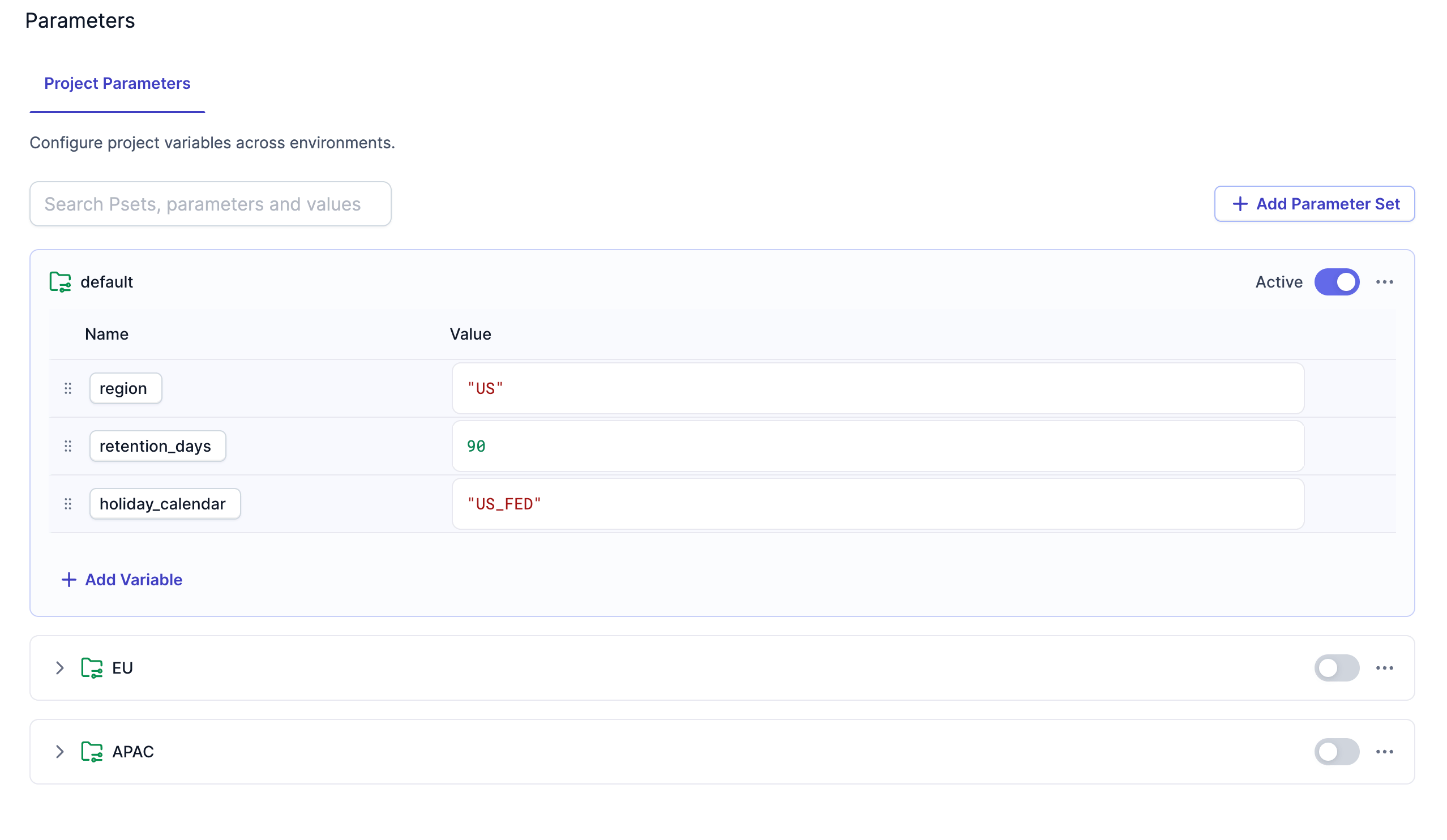
Source and target file enhancements
We’ve made several enhancements to the source and target gems for file storage systems:- Compression: Source gems can now read compressed files and target gems can now write compressed files in the following formats:
gzip,zstd,lz4,zlib,snappy, andlzop. - Examine: Gems now have an Examine button in the Location tab. When you click the Examine button, Prophecy reads a small sample of the file to automatically determine the file format, compression type (if any), and schema.
- Encryption: Target gems can now write encrypted files using the following encryption methods:
AES-192,AES-296, andBlowFish. Source gems cannot read encrypted files.
PySpark for data analysis projects
Private PreviewProphecy now offers Simplified PySpark for data analysis. This project type abstracts PySpark into a simple, data analysis interface. You can switch between SQL and PySpark project types in the development settings of a project.We’ve also added support for unit tests for PySpark projects. In future releases, we will support unit tests for SQL projects as well.SAP HANA target gem
The SAP HANA target gem now supports Delete and Insert and SCD2 write modes.ProphecySparkBasicsPython v0.2.54
This new version of the ProphecySparkBasicsPython package includes the following enhancements:- Added support for bulk updating target columns during SCD1 Delta merge. This way, you don’t have to write individual update expressions for each column.
- Added support for lateral column aliases in Reformat and Join gems. Lateral column aliasing in PySpark allows you to reuse a column alias defined earlier in the same clause.
Prophecy Library versions
- ProphecyLibsPython 2.1.9
- ProphecyLibsScala 8.16.0